Secure iOS app communication with backend – part 2: Dynamic SSL Pinning
In 2023, a popular banking app locked out 5 million users. The reason? The SSL certificate expired, and the app had hardcoded pinning. Users had to wait for a new version in the App Store - and the review process took several days.
This wasn't the first such case and won't be the last.
In the previous article, I showed request signing and quantum-secure TLS. Today we'll cover SSL pinning - why the static approach is a ticking time bomb, how to implement dynamic certificate rotation, and how to detect when someone is trying to bypass your protections.
Is SSL pinning still needed in 2026?
Before we dive into implementation, I need to address a controversial topic. The industry is increasingly saying: stop pinning.
OWASP updated their recommendations in 2025:
"Considering the current risks in the CA and browser space and comparing them to the risk of down time, pinning is not recommended for most applications."
Cloudflare went even further - in their article "Why certificate pinning is outdated" they noted a significant increase in outages caused by pinning (DigiCert migrations, Let's Encrypt chain rotations, sudden intermediate CA changes). Apple and Google also discourage pinning in their developer guidelines.
Arguments against pinning:
- PKI infrastructure has significantly improved (Certificate Transparency is now required, shorter certificate validity periods),
- Self-lockout risk is real and costly - one mistake = millions of users without access,
- Managing pins is additional operational complexity,
- iOS and Android have increasingly better default protections,
- Most "MITM attacks" that pinning protects against already require a compromised device (and then pinning can be bypassed anyway),
When pinning still makes sense (and only then):
- Heavily regulated applications (fintech level 2-3, healthcare level 4, military/gov),
- Very high threat model - nation-state actors, operating in countries with questionable control over local CAs,
- Messengers with E2E encryption, where even theoretical MITM risk is unacceptable,
- Situations where regulations require defense-in-depth (PCI-DSS, HIPAA in some interpretations).
| Application type | 2026 recommendation |
|---|---|
| Social media, games, lifestyle | Don't pin - outage risk > benefits |
| E-commerce, SaaS | Probably not - Certificate Transparency + monitoring is enough |
| Fintech level 1-2, healthcare level 1-3 | Consider, but assess risk vs benefits |
| Fintech level 3+, healthcare level 4+, gov/mil | Yes, but only dynamic approach with long migration period |
Summary: OWASP, Cloudflare, Apple and Google recommend completely abandoning pinning in most applications. The only sensible exceptions remain heavily regulated applications or those with very high threat models. Even then, they recommend dynamic pinning with cryptographic signature and long migration period - exactly as I describe below.
If you've decided that pinning is for you - read on. I'll show you how to do it right and avoid the pitfalls that have affected others.
Part 1: fundamentals - what to pin and how?
Certificate pinning vs public key pinning vs SPKI pinning
Before we write code, you need to choose what you're pinning:
| Method | What you pin | Advantages | Disadvantages |
|---|---|---|---|
| Certificate Pinning | Entire certificate (DER) | Simplest | Requires update with every certificate renewal |
| Public Key Pinning | Public key | You can renew certificate while keeping the key | Still requires update if you change the key |
| SPKI Pinning | SPKI hash (Subject Public Key Info) | Most flexible | Slightly more complex |
What to pin in the chain?
| Level | Advantages | Disadvantages | Recommendation |
|---|---|---|---|
| Leaf (server) | Most specific, lowest risk of false positives | Requires update with every certificate rotation | Pin leaf + backup |
| Intermediate | Less frequent rotation than leaf | Many domains may use the same intermediate | Optionally as additional backup |
| Root | Almost never changes | Too many certificates use it - useless as protection | Don't pin root |
Recommendation: Pin leaf certificate + 1-2 backup pins (future certificates). Optionally add intermediate as last fallback.
Recommendation: SPKI pinning with SHA-256. This is the industry standard (used by Chrome, TrustKit, OkHttp).
How to extract SPKI hash from a certificate
# Download certificate from server
openssl s_client -connect api.example.com:443 -servername api.example.com \
    < /dev/null 2>/dev/null | openssl x509 -outform PEM > server.pem

# Generate SPKI hash (SHA-256, base64)
openssl x509 -in server.pem -pubkey -noout | \
    openssl pkey -pubin -outform der | \
    openssl dgst -sha256 -binary | \
    openssl enc -base64
The result will look like this: BBBBBBBBBBBBBBBBBBBBBBBBBBBBBBBBBBBBBBBBBBB=
Shared function for SPKI hash extraction
Before we move to pinning implementation, let's create one shared function for SPKI hash extraction. This is critical - different implementations must generate identical hashes, consistent with what openssl produces.
import Foundation
import CryptoKit

/// Extension for extracting SPKI hash from certificate
///
/// IMPORTANT: Correct SPKI hash requires full ASN.1 DER structure:
/// SEQUENCE { SEQUENCE { OID algorithm, NULL/params }, BIT STRING pubkey }
///
/// Without this, the hash will NOT match what openssl generates!
extension SecCertificate {

    /// Extracts SPKI hash (SHA-256, base64) compatible with openssl
    func spkiHash() -> String? {
        // Get public key
        guard let publicKey = SecCertificateCopyKey(self) else {
            return nil
        }

        // Get key attributes (type and size)
        guard let attributes = SecKeyCopyAttributes(publicKey) as? [String: Any],
              let keyType = attributes[kSecAttrKeyType as String] as? String,
              let keySize = attributes[kSecAttrKeySizeInBits as String] as? Int else {
            return nil
        }

        // Get raw key data
        var error: Unmanaged<CFError>?
        guard let publicKeyData = SecKeyCopyExternalRepresentation(publicKey, &error) as Data? else {
            return nil
        }

        // Add ASN.1 SPKI header depending on key type
        let spkiData: Data

        if keyType == (kSecAttrKeyTypeRSA as String) {
            spkiData = Self.addRSASPKIHeader(to: publicKeyData, keySize: keySize)
        } else if keyType == (kSecAttrKeyTypeECSECPrimeRandom as String) {
            spkiData = Self.addECSPKIHeader(to: publicKeyData, keySize: keySize)
        } else {
            // Unknown key type - hash without header (fallback, may not work!)
            print("Unknown key type: \(keyType). SPKI hash may be incorrect.")
            spkiData = publicKeyData
        }

        // SHA-256 hash, base64 encoded
        let hash = SHA256.hash(data: spkiData)
        return Data(hash).base64EncodedString()
    }

    /// ASN.1 SPKI header for RSA
    private static func addRSASPKIHeader(to keyData: Data, keySize: Int) -> Data {
        // RSA OID: 1.2.840.113549.1.1.1
        let header: [UInt8]

        switch keySize {
        case 2048:
            header = [
                0x30, 0x82, 0x01, 0x22,  // SEQUENCE, length 290
                0x30, 0x0d,              // SEQUENCE, length 13
                0x06, 0x09,              // OID, length 9
                0x2a, 0x86, 0x48, 0x86, 0xf7, 0x0d, 0x01, 0x01, 0x01,  // rsaEncryption
                0x05, 0x00,              // NULL
                0x03, 0x82, 0x01, 0x0f,  // BIT STRING, length 271
                0x00                     // unused bits
            ]
        case 4096:
            header = [
                0x30, 0x82, 0x02, 0x22,  // SEQUENCE, length 546
                0x30, 0x0d,              // SEQUENCE, length 13
                0x06, 0x09,              // OID, length 9
                0x2a, 0x86, 0x48, 0x86, 0xf7, 0x0d, 0x01, 0x01, 0x01,  // rsaEncryption
                0x05, 0x00,              // NULL
                0x03, 0x82, 0x02, 0x0f,  // BIT STRING, length 527
                0x00                     // unused bits
            ]
        default:
            print("Unsupported RSA key size: \(keySize)")
            return keyData
        }

        return Data(header) + keyData
    }

    /// ASN.1 SPKI header for EC (P-256, P-384)
    private static func addECSPKIHeader(to keyData: Data, keySize: Int) -> Data {
        let header: [UInt8]

        switch keySize {
        case 256:  // P-256 / secp256r1 / prime256v1
            header = [
                0x30, 0x59,              // SEQUENCE, length 89
                0x30, 0x13,              // SEQUENCE, length 19
                0x06, 0x07,              // OID, length 7
                0x2a, 0x86, 0x48, 0xce, 0x3d, 0x02, 0x01,  // ecPublicKey
                0x06, 0x08,              // OID, length 8
                0x2a, 0x86, 0x48, 0xce, 0x3d, 0x03, 0x01, 0x07,  // prime256v1
                0x03, 0x42,              // BIT STRING, length 66
                0x00                     // unused bits
            ]
        case 384:  // P-384 / secp384r1
            header = [
                0x30, 0x76,              // SEQUENCE, length 118
                0x30, 0x10,              // SEQUENCE, length 16
                0x06, 0x07,              // OID, length 7
                0x2a, 0x86, 0x48, 0xce, 0x3d, 0x02, 0x01,  // ecPublicKey
                0x06, 0x05,              // OID, length 5
                0x2b, 0x81, 0x04, 0x00, 0x22,  // secp384r1
                0x03, 0x62,              // BIT STRING, length 98
                0x00                     // unused bits
            ]
        default:
            print("Unsupported EC key size: \(keySize)")
            return keyData
        }

        return Data(header) + keyData
    }
}
Now you can use certificate.spkiHash() everywhere - in both static and dynamic pinning.
Basic implementation with URLSession
Let's start with a simple implementation that we'll expand later:
import Foundation
import CryptoKit

/// SSL Pinning Configuration
struct SSLPinningConfig {
    let host: String
    let spkiHashes: Set<String>  // Base64-encoded SHA-256 hashes

    static let production = SSLPinningConfig(
        host: "api.example.com",
        spkiHashes: [
            "AAAAAAAAAAAAAAAAAAAAAAAAAAAAAAAAAAAAAAAAAAA=",  // Primary
            "BBBBBBBBBBBBBBBBBBBBBBBBBBBBBBBBBBBBBBBBBBB=",  // Backup 1
            "CCCCCCCCCCCCCCCCCCCCCCCCCCCCCCCCCCCCCCCCCCC="   // Backup 2
        ]
    )
}

/// URLSession Delegate with SSL Pinning
final class SSLPinningDelegate: NSObject, URLSessionDelegate {

    private let config: SSLPinningConfig
    private let onPinningFailure: ((String, String?) -> Void)?

    init(config: SSLPinningConfig, onPinningFailure: ((String, String?) -> Void)? = nil) {
        self.config = config
        self.onPinningFailure = onPinningFailure
    }

    func urlSession(
        _ session: URLSession,
        didReceive challenge: URLAuthenticationChallenge
    ) async -> (URLSession.AuthChallengeDisposition, URLCredential?) {

        // Check if this is a server trust challenge
        guard challenge.protectionSpace.authenticationMethod == NSURLAuthenticationMethodServerTrust,
              let serverTrust = challenge.protectionSpace.serverTrust else {
            return (.performDefaultHandling, nil)
        }

        let host = challenge.protectionSpace.host

        // Check if this is a host we're pinning
        guard host == config.host else {
            return (.performDefaultHandling, nil)
        }

        // Standard validation (chain of trust)
        var error: CFError?
        guard SecTrustEvaluateWithError(serverTrust, &error) else {
            onPinningFailure?(host, "Trust evaluation failed: \(error?.localizedDescription ?? "unknown")")
            return (.cancelAuthenticationChallenge, nil)
        }

        // Get certificate chain
        guard let certificateChain = SecTrustCopyCertificateChain(serverTrust) as? [SecCertificate],
              !certificateChain.isEmpty else {
            onPinningFailure?(host, "No certificates in chain")
            return (.cancelAuthenticationChallenge, nil)
        }

        // Check each certificate in the chain
        for certificate in certificateChain {
            if let spkiHash = certificate.spkiHash(),
               config.spkiHashes.contains(spkiHash) {
                // Found matching pin!
                let credential = URLCredential(trust: serverTrust)
                return (.useCredential, credential)
            }
        }

        // No pin matches
        let receivedHash = certificateChain.first?.spkiHash()
        onPinningFailure?(host, "No matching pin. Received: \(receivedHash ?? "unknown")")
        return (.cancelAuthenticationChallenge, nil)
    }
}
Usage
let config = SSLPinningConfig.production
let delegate = SSLPinningDelegate(config: config) { host, reason in
    // Log attempts with invalid certificate
    print("SSL Pinning failure for \(host): \(reason ?? "unknown")")

    // Send event to analytics/monitoring
    Analytics.track("ssl_pinning_failure", properties: [
        "host": host,
        "reason": reason ?? "unknown"
    ])
}

let session = URLSession(
    configuration: .default,
    delegate: delegate,
    delegateQueue: nil
)

// Use session normally
let (data, response) = try await session.data(from: url)
Attacker's perspective: how they attack static pinning
Before we move to dynamic pinning, let's see why the static approach is vulnerable to attacks.
Attack 1: Frida + Objection (jailbroken device)
# Attacker connects to running application
objection -g com.example.app explore

# One command disables ALL pinning
ios sslpinning disable

# Now they can intercept traffic via Burp/Charles
What happens under the hood? Objection hooks SecTrustEvaluateWithError and forces it to return true for every certificate.
Defense: Frida detection (I'll show later) + App Attest (next article).
Attack 2: SSL Kill Switch 2 (jailbroken device)
A Cydia tweak that globally disables pinning for all applications - without any interaction with a specific app.
Defense: Jailbreak detection + runtime integrity checks.
Attack 3: IPA modification (non-jailbroken)
# Attacker downloads IPA,
# Decompiles, finds pinning code,
# Removes or patches validation,
# Re-signs with their own developer certificate,
# Installs modified version,
Defense: Runtime code signing verification + App Attest (server-side verification).
Attack 4: Attack on dynamic pinning - MITM when downloading pin list
1. Attacker controls network (corporate proxy, evil twin WiFi),
2. App starts and tries to download pin list,
3. Request to pin server is NOT pinned (chicken-egg problem),
4. Attacker serves their own list with their own certificate,
5. App "pins" to attacker's certificate,
Defense:
- Pin list must be cryptographically signed (ECDSA),
- Verification key is hardcoded in the app,
- Attacker cannot forge signature without private key,
Attack 5: Replay of old pin list
Attacker intercepted an old, properly signed pin list and serves it to the app to force use of an old certificate (which may be compromised).
Defense:
- Pin list has
expiresAt- app rejects expired lists, - List has
issuedAt- app can reject lists older than current, - Fallback pins as last resort,
Part 2: dynamic SSL pinning - key to safe rotation
Static pinning (hardcoded hashes in the app) is a recipe for disaster. What happens when:
- Certificate expires unexpectedly?
- You need to urgently change certificate due to compromise?
- Your CDN changes certificate without notice?
Answer: lockout - users can't use the app until an update.
Dynamic pinning architecture
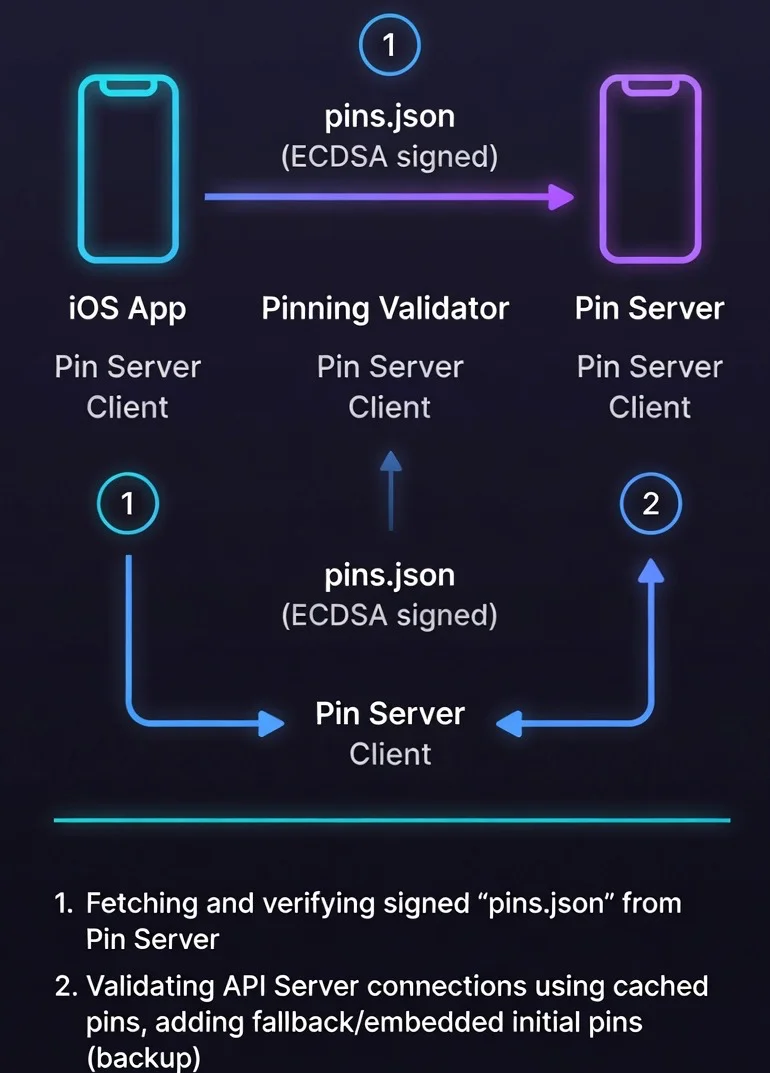
Principles:
- App downloads pin list from server at startup,
- List is signed with private key (ECDSA),
- App verifies signature before using pins,
- Fallback pins are hardcoded in case server is unavailable,
- Pins have expiration date - app knows when to refresh.
Dynamic Pin Store implementation
import Foundation
import CryptoKit

/// Single pin structure
struct CertificatePin: Codable {
    let host: String
    let spkiHash: String
    let expiresAt: Date
    let isPrimary: Bool

    var isExpired: Bool {
        Date() > expiresAt
    }
}

/// Signed pin list from server
struct SignedPinList: Codable {
    let version: Int           // Schema version (for future compatibility)
    let pins: [CertificatePin]
    let issuedAt: Date
    let expiresAt: Date
    let signature: String      // Base64-encoded ECDSA signature

    /// Data to verify (everything except signature)
    var signedData: Data {
        let encoder = JSONEncoder()
        encoder.dateEncodingStrategy = .iso8601
        encoder.outputFormatting = .sortedKeys  // Important for consistency!

        struct SignedContent: Codable {
            let version: Int
            let pins: [CertificatePin]
            let issuedAt: Date
            let expiresAt: Date
        }

        let content = SignedContent(
            version: version,
            pins: pins,
            issuedAt: issuedAt,
            expiresAt: expiresAt
        )
        return (try? encoder.encode(content)) ?? Data()
    }
}

/// Dynamic Pin Store with caching and fallback
actor DynamicPinStore {

    // MARK: - Configuration

    /// Public key for signature verification (P-256)
    /// In production: embedded in app
    private let verificationKey: P256.Signing.PublicKey

    /// URL for downloading pins
    private let pinServerURL: URL

    /// Fallback pins (hardcoded, used when server unavailable)
    private let fallbackPins: [CertificatePin]

    /// Cache
    private var cachedPins: [CertificatePin] = []
    private var cacheExpiresAt: Date = .distantPast

    /// Persistence
    private let cacheURL: URL

    // MARK: - Initialization

    init(
        verificationKeyBase64: String,
        pinServerURL: URL,
        fallbackPins: [CertificatePin]
    ) throws {
        guard let keyData = Data(base64Encoded: verificationKeyBase64) else {
            throw PinStoreError.invalidVerificationKey
        }

        self.verificationKey = try P256.Signing.PublicKey(x963Representation: keyData)
        self.pinServerURL = pinServerURL
        self.fallbackPins = fallbackPins

        // Cache in Application Support
        let appSupport = FileManager.default.urls(for: .applicationSupportDirectory, in: .userDomainMask).first!
        self.cacheURL = appSupport.appendingPathComponent("pinstore_cache.json")

        // Load cache at startup
        Task {
            await loadCachedPins()
        }
    }

    // MARK: - Public API

    /// Gets current pins for host
    func pins(for host: String) async -> Set<String> {
        // First try from cache
        if !cachedPins.isEmpty && Date() < cacheExpiresAt {
            let hostPins = cachedPins
                .filter { $0.host == host && !$0.isExpired }
                .map { $0.spkiHash }

            if !hostPins.isEmpty {
                return Set(hostPins)
            }
        }

        // Try to refresh from server
        do {
            try await refreshPins()

            let hostPins = cachedPins
                .filter { $0.host == host && !$0.isExpired }
                .map { $0.spkiHash }

            return Set(hostPins)
        } catch {
            // Fallback
            print("Failed to refresh pins: \(error). Using fallback.")
            return Set(fallbackPins.filter { $0.host == host }.map { $0.spkiHash })
        }
    }

    /// Forces pin refresh
    func refreshPins() async throws {
        // Download from server (WITHOUT pinning for this request!)
        let config = URLSessionConfiguration.default
        config.timeoutIntervalForRequest = 10   // 10 second timeout
        config.timeoutIntervalForResource = 15  // Max 15 seconds total
        let session = URLSession(configuration: config)

        let (data, response) = try await session.data(from: pinServerURL)

        guard let httpResponse = response as? HTTPURLResponse,
              httpResponse.statusCode == 200 else {
            throw PinStoreError.serverError
        }

        // Parse JSON
        let decoder = JSONDecoder()
        decoder.dateDecodingStrategy = .iso8601
        let signedList = try decoder.decode(SignedPinList.self, from: data)

        // Verify signature!
        guard try verifySignature(of: signedList) else {
            throw PinStoreError.invalidSignature
        }

        // Check if list hasn't expired
        guard Date() < signedList.expiresAt else {
            throw PinStoreError.expiredPinList
        }

        // Update cache
        cachedPins = signedList.pins
        cacheExpiresAt = signedList.expiresAt

        // Save to persistence
        try await saveCachedPins(data: data)
    }

    // MARK: - Signature Verification

    private func verifySignature(of signedList: SignedPinList) throws -> Bool {
        guard let signatureData = Data(base64Encoded: signedList.signature) else {
            return false
        }

        let signature = try P256.Signing.ECDSASignature(derRepresentation: signatureData)

        return verificationKey.isValidSignature(
            signature,
            for: signedList.signedData
        )
    }

    // MARK: - Persistence

    private func loadCachedPins() {
        guard let data = try? Data(contentsOf: cacheURL) else { return }

        let decoder = JSONDecoder()
        decoder.dateDecodingStrategy = .iso8601

        guard let signedList = try? decoder.decode(SignedPinList.self, from: data),
              (try? verifySignature(of: signedList)) == true,
              Date() < signedList.expiresAt else {
            return
        }

        cachedPins = signedList.pins
        cacheExpiresAt = signedList.expiresAt
    }

    private func saveCachedPins(data: Data) async throws {
        try data.write(to: cacheURL, options: .atomic)
    }
}

enum PinStoreError: Error {
    case invalidVerificationKey
    case serverError
    case invalidSignature
    case expiredPinList
}
Integrated delegate with dynamic pinning
/// URLSession Delegate with dynamic pinning
final class DynamicSSLPinningDelegate: NSObject, URLSessionDelegate {

    private let pinStore: DynamicPinStore
    private let onPinningFailure: ((String, String?) -> Void)?

    init(pinStore: DynamicPinStore, onPinningFailure: ((String, String?) -> Void)? = nil) {
        self.pinStore = pinStore
        self.onPinningFailure = onPinningFailure
    }

    func urlSession(
        _ session: URLSession,
        didReceive challenge: URLAuthenticationChallenge
    ) async -> (URLSession.AuthChallengeDisposition, URLCredential?) {

        guard challenge.protectionSpace.authenticationMethod == NSURLAuthenticationMethodServerTrust,
              let serverTrust = challenge.protectionSpace.serverTrust else {
            return (.performDefaultHandling, nil)
        }

        let host = challenge.protectionSpace.host

        // Get current pins for host
        let validPins = await pinStore.pins(for: host)

        // If no pins for this host - use default validation
        guard !validPins.isEmpty else {
            return (.performDefaultHandling, nil)
        }

        // Standard validation
        var error: CFError?
        guard SecTrustEvaluateWithError(serverTrust, &error) else {
            onPinningFailure?(host, "Trust evaluation failed")
            return (.cancelAuthenticationChallenge, nil)
        }

        // Check pins
        guard let chain = SecTrustCopyCertificateChain(serverTrust) as? [SecCertificate] else {
            onPinningFailure?(host, "No certificate chain")
            return (.cancelAuthenticationChallenge, nil)
        }

        for cert in chain {
            if let hash = cert.spkiHash(), validPins.contains(hash) {
                return (.useCredential, URLCredential(trust: serverTrust))
            }
        }

        onPinningFailure?(host, "No matching pin in dynamic store")
        return (.cancelAuthenticationChallenge, nil)
    }
}
Additional layer: Certificate Transparency
Dynamic pinning protects against fake certificates, but the most security-conscious implementations in 2026 add another layer - Certificate Transparency (CT) verification.
CT is a public log of all issued certificates. If an attacker obtains a "legitimate" certificate from a compromised CA, it will be visible in CT logs - making detection easier.
/// Certificate Transparency verification
/// Checks if certificate has required SCT (Signed Certificate Timestamps)
func verifyCertificateTransparency(serverTrust: SecTrust) -> Bool {
    // iOS automatically enforces CT for new certificates since 2021
    // but you can additionally check the policy

    let policy = SecPolicyCreateSSL(true, nil)
    SecTrustSetPolicies(serverTrust, policy)

    // Set CT requirement
    if #available(iOS 12.1.1, *) {
        // iOS automatically checks CT for certificates issued after 15 Oct 2018
        // Additional verification is not required, but you can log
    }

    var error: CFError?
    let isValid = SecTrustEvaluateWithError(serverTrust, &error)

    if !isValid, let error = error {
        let errorCode = CFErrorGetCode(error)
        // errSecCertificateRevoked = -67820
        // errSecNotTrusted = -67843
        print("CT/Trust error: \(errorCode)")
    }

    return isValid
}
Pro tip: Since iOS 12.1.1, Apple requires CT for all certificates issued after October 15, 2018.
SecTrustEvaluateWithErrorautomatically rejects certificates without required SCTs (minimum 2 SCTs from approved logs) according to Apple's policy. You don't need to implement this manually - you get this protection for free.
Note on OCSP/CRL: iOS supports OCSP stapling automatically, but doesn't enforce hard-fail when OCSP response is missing (soft-fail). For apps with highest requirements, consider your own revocation status verification or using services like CRLite.
Attacker's perspective: attacks on dynamic pinning
Dynamic pinning is much harder to bypass, but not impossible.
Attack 1: Hooking signature verification
// Frida script - hooks ECDSA verification
Interceptor.attach(Module.findExportByName(null, "SecKeyVerifySignature"), {
  onLeave: function (retval) {
    // Forces true for every verification
    retval.replace(1);
  },
});
Attacker can force acceptance of any pin list, even without a valid signature.
Defense:
- Use multiple verification layers (not just one point),
- App Attest verifies integrity server-side - even if client-side is hooked,
- Code obfuscation makes finding hook points harder,
Attack 2: Timing attack - race at app startup
1. App starts,
2. Attacker VERY quickly serves fake pin list,
3. Before Frida detection loads,
4. App caches fake pins,
Defense:
- Hardcoded fallback pins (you always have backup),
- Signature verification BEFORE using list (cryptographic, not timing-dependent),
- Delay critical network operations until security initialization completes,
Attack 3: Downgrade to fallback pins
Attacker blocks access to pin server (DNS poisoning, firewall), forcing use of fallback pins. If fallback pins are outdated...
Defense:
- Fallback pins must be as secure as dynamic ones,
- Regularly update fallback pins in new app versions,
- Log fallback usage - sudden increase = potential attack or infrastructure issue,
Attack 4: Signing key compromise
If attacker obtains the private key used for signing pin lists, they can generate their own "valid" lists.
Defense:
- Private key in HSM (Hardware Security Module), never on regular server,
- Signing key rotation (with graceful migration),
- Key usage monitoring - alert on signing outside CI/CD,
### Server-side: generating signed pin list

```python
# generate_pins.py
import json
import hashlib
import base64
from datetime import datetime, timedelta
from cryptography.hazmat.primitives import hashes, serialization
from cryptography.hazmat.primitives.asymmetric import ec

# Load private key (store in HSM in production!)
with open("pin_signing_key.pem", "rb") as f:
    private_key = serialization.load_pem_private_key(f.read(), password=None)

# Pin list
pins = [
    {
        "host": "api.example.com",
        "spkiHash": "AAAAAAAAAAAAAAAAAAAAAAAAAAAAAAAAAAAAAAAAAAA=",
        "expiresAt": (datetime.utcnow() + timedelta(days=90)).isoformat() + "Z",
        "isPrimary": True
    },
    {
        "host": "api.example.com",
        "spkiHash": "BBBBBBBBBBBBBBBBBBBBBBBBBBBBBBBBBBBBBBBBBBB=",
        "expiresAt": (datetime.utcnow() + timedelta(days=180)).isoformat() + "Z",
        "isPrimary": False
    }
]

# Prepare data for signing (with version for future compatibility)
content = {
    "version": 1,  # Increment when you change schema
    "pins": pins,
    "issuedAt": datetime.utcnow().isoformat() + "Z",
    "expiresAt": (datetime.utcnow() + timedelta(days=30)).isoformat() + "Z"
}

# Canonical JSON (sorted keys - CRITICAL for consistency!)
content_bytes = json.dumps(content, sort_keys=True, separators=(',', ':')).encode()

# Sign with ECDSA P-256
signature = private_key.sign(content_bytes, ec.ECDSA(hashes.SHA256()))

# Final structure
signed_list = {
    **content,
    "signature": base64.b64encode(signature).decode()
}

print(json.dumps(signed_list, indent=2))
Part 3: bypass attempt detection
SSL pinning can be bypassed. Frida, Objection, SSL Kill Switch - these are tools that attackers (and pentesters) use daily. The question isn't "will someone try" but "how quickly will you detect it".
Attacker's perspective: how they bypass SSL pinning?
Method 1: Frida + Objection
# Attacker on jailbroken device
objection -g com.example.app explore
ios sslpinning disable
This hooks SecTrustEvaluateWithError and always returns true.
Method 2: SSL Kill Switch 2
Cydia tweak that globally disables pinning for all applications.
Method 3: IPA modification
Decompilation, removing pinning code, re-signing.
Multi-layered defense
Pinning implementation alone isn't enough. You need detection + response:
Important disclaimer: The code below is level 1 detection - sufficient for most apps, but insufficient for fintech level 3-4 or apps with highest security requirements.
Why?
- Frida-Gadget can be loaded without "frida" in strings,
- Modern tools (StrongR Frida) actively hide their presence,
- Attackers can hook the detection functions themselves,
What to do in high-security apps?
- Use App Attest (next article) - server-side verification,
- Consider commercial solutions (Appdome, Approov) with continuous signature updates,
- Add inline hooking detection (code checksum at runtime),
- Check symbol table integrity.
/// SSL Pinning bypass attempt detector
///
/// This is level 1 detection. For fintech/healthcare level 3+
/// use App Attest + commercial solutions.
final class PinningBypassDetector {

    /// Checks known Frida signatures
    static func detectFrida() -> Bool {
        // 1. Check if Frida is listening on typical ports
        let fridaPorts = [27042, 27043]
        for port in fridaPorts {
            if isPortOpen(port) {
                return true
            }
        }

        // 2. Check for Frida libraries presence
        let fridaLibraries = [
            "FridaGadget",
            "frida-agent",
            "libfrida"
        ]

        for lib in fridaLibraries {
            if isLibraryLoaded(lib) {
                return true
            }
        }

        // 3. Check thread names (Frida creates characteristic ones)
        if hasSuspiciousThreadNames() {
            return true
        }

        return false
    }

    /// Checks jailbreak (required for most attacks)
    static func detectJailbreak() -> Bool {
        // Typical jailbreak paths
        let paths = [
            "/Applications/Cydia.app",
            "/Library/MobileSubstrate/MobileSubstrate.dylib",
            "/bin/bash",
            "/usr/sbin/sshd",
            "/etc/apt",
            "/private/var/lib/apt/",
            "/usr/bin/ssh"
        ]

        for path in paths {
            if FileManager.default.fileExists(atPath: path) {
                return true
            }
        }

        // Check if we can write outside sandbox
        let testPath = "/private/jailbreak_test_\(UUID().uuidString)"
        do {
            try "test".write(toFile: testPath, atomically: true, encoding: .utf8)
            try FileManager.default.removeItem(atPath: testPath)
            return true  // Success = jailbreak
        } catch {
            // Good - we can't write
        }

        return false
    }

    /// Checks if debugger is attached
    static func detectDebugger() -> Bool {
        var info = kinfo_proc()
        var size = MemoryLayout<kinfo_proc>.stride
        var mib: [Int32] = [CTL_KERN, KERN_PROC, KERN_PROC_PID, getpid()]

        let result = sysctl(&mib, UInt32(mib.count), &info, &size, nil, 0)

        if result == 0 {
            return (info.kp_proc.p_flag & P_TRACED) != 0
        }

        return false
    }

    // MARK: - Helpers

    private static func isPortOpen(_ port: Int) -> Bool {
        let socketFD = socket(AF_INET, SOCK_STREAM, 0)
        guard socketFD != -1 else { return false }
        defer { close(socketFD) }

        var addr = sockaddr_in()
        addr.sin_family = sa_family_t(AF_INET)
        addr.sin_port = UInt16(port).bigEndian
        addr.sin_addr.s_addr = inet_addr("127.0.0.1")

        let result = withUnsafePointer(to: &addr) {
            $0.withMemoryRebound(to: sockaddr.self, capacity: 1) {
                connect(socketFD, $0, socklen_t(MemoryLayout<sockaddr_in>.size))
            }
        }

        return result == 0
    }

    private static func isLibraryLoaded(_ name: String) -> Bool {
        for i in 0..<_dyld_image_count() {
            if let imageName = _dyld_get_image_name(i) {
                let path = String(cString: imageName)
                if path.lowercased().contains(name.lowercased()) {
                    return true
                }
            }
        }
        return false
    }

    private static func hasSuspiciousThreadNames() -> Bool {
        // Frida creates characteristic threads: "gum-js-loop", "gmain", "gdbus"
        // Implementation via mach_task_threads API

        var threadList: thread_act_array_t?
        var threadCount: mach_msg_type_number_t = 0

        let result = task_threads(mach_task_self_, &threadList, &threadCount)
        guard result == KERN_SUCCESS, let threads = threadList else {
            return false
        }

        defer {
            vm_deallocate(mach_task_self_, vm_address_t(bitPattern: threads), vm_size_t(threadCount) * vm_size_t(MemoryLayout<thread_t>.size))
        }

        let suspiciousNames = ["gum-js-loop", "gmain", "gdbus", "frida", "linjector"]

        for i in 0..<Int(threadCount) {
            var info = thread_extended_info()
            var infoCount = mach_msg_type_number_t(THREAD_EXTENDED_INFO_COUNT)

            let kr = withUnsafeMutablePointer(to: &info) {
                $0.withMemoryRebound(to: integer_t.self, capacity: Int(infoCount)) {
                    thread_info(threads[i], thread_flavor_t(THREAD_EXTENDED_INFO), $0, &infoCount)
                }
            }

            if kr == KERN_SUCCESS {
                let name = withUnsafePointer(to: info.pth_name) {
                    $0.withMemoryRebound(to: CChar.self, capacity: 64) {
                        String(cString: $0)
                    }
                }

                for suspicious in suspiciousNames {
                    if name.lowercased().contains(suspicious) {
                        return true
                    }
                }
            }
        }

        return false
    }

    /// Checks if code was modified (inline hooking)
    /// Level 2 detection - checks if first instructions of key functions were overwritten
    static func detectInlineHooking() -> Bool {
        // Check if SecTrustEvaluateWithError doesn't start with JMP/BR
        // This requires low-level machine code analysis
        // Omitted for brevity - requires ARM64 opcodes knowledge
        return false
    }
}
Integration with SSL pinning
/// Extended delegate with bypass detection
final class SecureSSLPinningDelegate: NSObject, URLSessionDelegate {

    private let pinStore: DynamicPinStore
    private let onSecurityEvent: ((SecurityEvent) -> Void)?

    enum SecurityEvent {
        case pinningFailure(host: String, reason: String?)
        case fridaDetected
        case jailbreakDetected
        case debuggerDetected
    }

    init(pinStore: DynamicPinStore, onSecurityEvent: ((SecurityEvent) -> Void)? = nil) {
        self.pinStore = pinStore
        self.onSecurityEvent = onSecurityEvent

        // Check environment at initialization
        performSecurityChecks()
    }

    private func performSecurityChecks() {
        if PinningBypassDetector.detectFrida() {
            onSecurityEvent?(.fridaDetected)
        }

        if PinningBypassDetector.detectJailbreak() {
            onSecurityEvent?(.jailbreakDetected)
        }

        if PinningBypassDetector.detectDebugger() {
            onSecurityEvent?(.debuggerDetected)
        }
    }

    func urlSession(
        _ session: URLSession,
        didReceive challenge: URLAuthenticationChallenge
    ) async -> (URLSession.AuthChallengeDisposition, URLCredential?) {

        // Additional check before each request
        if PinningBypassDetector.detectFrida() {
            onSecurityEvent?(.fridaDetected)
            return (.cancelAuthenticationChallenge, nil)
        }

        // ... rest of pinning implementation

        return (.performDefaultHandling, nil)
    }
}
What to do when you detect an attack?
Best defense in 2026: Instead of relying solely on client-side detection (which can be bypassed), use App Attest for server-side verification. Backend can reject requests from modified apps, even if client-side detection was disabled. Details in the next article.
/// Attack response handler
final class SecurityResponseHandler {

    static func handleSecurityEvent(_ event: SecureSSLPinningDelegate.SecurityEvent) {
        switch event {
        case .fridaDetected:
            // Immediate response - most likely an attack
            logSecurityIncident(type: "frida_detected", severity: .critical)
            clearSensitiveData()
            terminateSession()

        case .jailbreakDetected:
            // Warning - may be legitimate power user
            logSecurityIncident(type: "jailbreak_detected", severity: .warning)
            // Consider limiting functionality instead of blocking

        case .debuggerDetected:
            // May be developer - check if it's debug build
            #if !DEBUG
            logSecurityIncident(type: "debugger_detected", severity: .high)
            #endif

        case .pinningFailure(let host, let reason):
            // May be MITM attack or certificate issue
            logSecurityIncident(
                type: "pinning_failure",
                severity: .high,
                metadata: ["host": host, "reason": reason ?? "unknown"]
            )
        }
    }

    private static func logSecurityIncident(
        type: String,
        severity: Severity,
        metadata: [String: String] = [:]
    ) {
        // Send to backend (via separate, non-pinned endpoint)
        var payload = metadata
        payload["type"] = type
        payload["severity"] = severity.rawValue
        payload["timestamp"] = ISO8601DateFormatter().string(from: Date())
        payload["device_id"] = UIDevice.current.identifierForVendor?.uuidString ?? "unknown"

        // Use URLSession without pinning for this request
        Task {
            try? await sendSecurityLog(payload)
        }
    }

    private static func clearSensitiveData() {
        // Clear tokens, keys, user data
        KeychainManager.clearAllSensitiveData()
        UserDefaults.standard.removePersistentDomain(forName: Bundle.main.bundleIdentifier!)
    }

    private static func terminateSession() {
        // Log out user and close app
        DispatchQueue.main.async {
            // Show alert before closing
            let alert = UIAlertController(
                title: "Security threat detected",
                message: "The app will be closed for your protection.",
                preferredStyle: .alert
            )
            // exit(0) after OK
        }
    }

    enum Severity: String {
        case warning, high, critical
    }
}
Part 4: certificate rotation strategy
Safe rotation timeline:
Day 0: Generate new certificate (keeping old key or creating new)
       ↓
Day 1: Add new SPKI hash to pin server
       ↓
Day 1-30: Apps download updated pin list
       ↓
Day 30: Install new certificate on server
        (old pin still works as fallback)
       ↓
Day 60: Remove old pin from list
Rotation checklist
-
Before rotation:
- Generate new certificate/key,
- Calculate new SPKI hash,
- Add to dynamic pin list as backup (isPrimary: false),
- Wait for propagation (min. 2 weeks),
-
During rotation:
- Install new certificate on server,
- Monitor pinning errors (sudden increase = problem),
- Update list: new pin as primary, old as backup,
-
After rotation:
- Monitor for 2-4 weeks,
- Remove old pin from list,
- Archive old certificate (in case of rollback),
CI/CD automation
# .github/workflows/rotate-pins.yml
name: Certificate Pin Rotation

on:
  schedule:
    - cron: "0 0 1 * *" # First day of each month
  workflow_dispatch:

jobs:
  check-expiration:
    runs-on: ubuntu-latest
    steps:
      - name: Check certificate expiration
        run: |
          EXPIRY=$(echo | openssl s_client -connect api.example.com:443 2>/dev/null | \
                   openssl x509 -noout -enddate | cut -d= -f2)
          EXPIRY_EPOCH=$(date -d "$EXPIRY" +%s)
          NOW_EPOCH=$(date +%s)
          DAYS_LEFT=$(( ($EXPIRY_EPOCH - $NOW_EPOCH) / 86400 ))

          if [ $DAYS_LEFT -lt 30 ]; then
            echo "::warning::Certificate expires in $DAYS_LEFT days!"
            echo "NEEDS_ROTATION=true" >> $GITHUB_ENV
          fi

      - name: Trigger rotation workflow
        if: env.NEEDS_ROTATION == 'true'
        run: |
          # Send alert to Slack/PagerDuty
          # Optionally: automatically generate new cert with Let's Encrypt
Ready-made solutions vs DIY
If you don't want to maintain all this yourself, the most popular solutions in 2026 are:
Free / Open Source:
- TrustKit (DataTheorem) - excellent library with dynamic config, easy integration, actively maintained,
- Alamofire with
ServerTrustManager- if you're already using Alamofire, it has built-in pinning support,
Paid (full defense-in-depth):
- Approov - dynamic pinning + App Attest + runtime protection, cloud-based attestation,
- Appdome - no-code integration, anti-Frida, anti-tampering,
- PerimeterX / HUMAN - bot protection + mobile security.
| Solution | Price | Dynamic Pinning | App Attest | Anti-Frida | Effort |
|---|---|---|---|---|---|
| DIY (this article) | Free | Yes | Manual | Basic | High |
| TrustKit | Free | Yes | No | No | Medium |
| Approov | $$$ | Yes | Yes | Yes | Low |
| Appdome | $$$ | Yes | Yes | Yes | Very Low |
My recommendation: For most teams, TrustKit + App Attest (self-implemented) is the sweet spot. If you have budget and want zero maintenance - Approov or Appdome. If you want full control and understand what you're doing - the implementation from this article is a solid foundation.
Summary: your SSL pinning checklist
Before you start implementing, ask yourself these questions:
- Do you really need pinning? (OWASP/Cloudflare 2026: most apps don't need it)
- Do you have a threat model requiring pinning? (fintech 3+, healthcare 4+, gov/mil, nation-state actors)
- Do you have resources to maintain dynamic pinning infrastructure?
- Have you considered alternatives? (Certificate Transparency monitoring, strong TLS config)
Implementation:
- You're using SPKI pinning (not certificate pinning),
- You're pinning leaf certificate + backup pins (not root!),
- Hash is correct (full ASN.1 SPKI, compatible with
openssl dgst -sha256), - You have minimum 2-3 backup pins,
- Dynamic pin list from server (not hardcoded),
- Pin list is cryptographically signed (ECDSA),
- Fallback pins in case server is unavailable,
- Pin cache with expiration time,
- Certificate Transparency is verified (iOS does this automatically since 12.1.1),
Attack detection:
- Frida/Objection detection (level 1),
- Jailbreak detection (with reasonable response - don't block all power users),
- Logging bypass attempts to backend,
- Alerting for security team,
- App Attest for server-side verification (next article),
Operations:
- Documented rotation procedure (with timeline),
- Pinning error monitoring (dashboard + alerts),
- CI/CD checks certificate expiration (30+ days ahead),
- Testing pinning in QA (with proxy like Charles/Proxyman),
- Rollback plan in case of lockout.
What's next?
In the next article, we'll close the series with App Attest and DeviceCheck - how to prove to the backend that a request comes from an unmodified, official instance of your app. This is the final piece of the puzzle: request signing + quantum TLS + SSL pinning + device attestation.

Rafał Dubiel
Senior iOS Developer with 8+ years of experience building mobile applications. Passionate about clean architecture, Swift, and sharing knowledge with the community.
Share this article: