iOS Databases in 2026: The Complete Guide
Throughout my career, I've seen iOS developers make the same database mistakes over and over again - and I've made a few of them myself. I've seen apps storing OAuth tokens in UserDefaults, stuffing huge images directly into the database, or migrating from Core Data to Realm... right before Realm Sync deprecation was announced.
This article exists so you don't have to make those mistakes.
TL;DR - decision matrix
Before we dive into the details, here's the quick answer:
| Scenario | Recommendation | Why? |
|---|---|---|
| New SwiftUI project, iOS 17+ | SwiftData | Minimal boilerplate, native integration |
| Existing UIKit project | Core Data | Stability, full control |
| Large datasets (100k+ records) | GRDB.swift | Raw SQLite performance |
| Cross-platform (iOS + Android) | SQLite (GRDB) | Schema portability |
| iCloud sync (private data) | SwiftData/Core Data + CloudKit | Free synchronization |
| Data shared between users | CloudKit directly | SwiftData doesn't support shared databases |
| Maximum write performance | GRDB.swift | 10-20x faster than SwiftData |
| Database encryption | SQLCipher + GRDB | AES-256 out of the box |
| User preferences | UserDefaults | Simplicity, speed |
| Sensitive data (tokens, passwords) | Keychain | Hardware-backed encryption |
Part 1: Apple's native solutions
SwiftData - the new king or premature hype?
SwiftData, introduced at WWDC 2023, was supposed to be the answer to developer frustrations with Core Data. Three years and three iOS versions later - what's the reality?
State as of iOS 26 (February 2026): SwiftData has finally matured for production. Apple fixed critical bugs from iOS 18.x, added model inheritance, and - most importantly - many fixes are backward compatible to iOS 17.
What SwiftData does well:
// Model definition - zero boilerplate
@Model
class Note {
    var title: String
    var content: String
    var createdAt: Date

    init(title: String, content: String) {
        self.title = title
        self.content = content
        self.createdAt = Date()
    }
}

// Fetching data in SwiftUI - one line
@Query var notes: [Note]
This is beautiful. No more NSManagedObject, .xcdatamodeld files, or manual context management. But...
Things Apple doesn't tell you (though the situation is improving)
Problem #1: Instability between iOS versions
The state on iOS 18.0–18.1 was rough. Apple made significant internal changes, leading to regressions - especially in relationships and memory management:
// This code worked on iOS 17 but crashed on iOS 18.0-18.1
let student = Student(school: school, name: "Jan")
context.insert(student)
// iOS 18.0: school relationship = nil (!)

// Workaround required for iOS 18.0-18.1
if #available(iOS 18.0, *) {
    school.students.append(student)
}
Good news: Apple fixed many of these behaviors in iOS 18.2–18.4, and iOS 26 resolved nearly all critical bugs. What's more, two key fixes are backward compatible to iOS 17:
- Bug with views not refreshing when using
@ModelActor- fixed, - Using
Codableproperties in predicates - fixed.
However, I still wouldn't recommend SwiftData for apps with more than 50–70k records or very complex relationships - GRDB or Core Data will be a safer choice there.
Problem #2: Extreme memory usage (iOS 18)
Calling .count on a relationship or @Query loads ALL objects into memory:
// On iOS 18 this can consume hundreds of MB of RAM
let count = notes.count  // Loads all notes!
The workaround requires using FetchDescriptor with propertiesToFetch:
var descriptor = FetchDescriptor<Note>()
if #available(iOS 18, *) {
    descriptor.propertiesToFetch = [\.createdAt]  // Only lightweight property
}
let count = try context.fetchCount(descriptor)
Problem #3: No full migrations
SwiftData only supports lightweight migrations. If you need custom migrations - you're back to Core Data or risking user data loss.
Problem #4: WWDC 2025 brought... one new feature
Model inheritance. That's it. The SwiftData section at WWDC 2025 was probably the shortest segment in Apple conference history - you won't even finish your coffee.
// Model inheritance - iOS 26+ ONLY
@available(iOS 26, *)
@Model
class Trip {
    var destination: String
    var startDate: Date
    var endDate: Date
}

@available(iOS 26, *)
@Model
class BusinessTrip: Trip {
    var perDiem: Decimal = 0
    var client: String = ""
}

@available(iOS 26, *)
@Model
class PersonalTrip: Trip {
    var reason: TripReason = .vacation
}
Migration to inheritance: Migration to a schema with inheritance is lightweight, but requires
@availableon the schema and all subclasses - test thoroughly on iOS 26+. Edge-case bugs have also been reported: fetch on superclass doesn't always correctly see subclass properties (Apple Forums, February 2026).
Useful? Yes, for some. But after three years we still haven't gotten:
- Shared databases in CloudKit - still missing!
- Dynamic predicates,
- Groups and aggregations (GROUP BY),
- NSFetchedResultsController equivalent.
What SwiftData does well in 2025/2026
@ModelActor - game changer for background operations
This is one of the biggest steps forward in SwiftData. It allows you to sensibly perform background operations without @MainActor spaghetti:
@ModelActor
actor BackgroundImporter {
    func importLargeJSON(_ data: Data) throws {
        let decoder = JSONDecoder()
        let dtos = try decoder.decode([NoteDTO].self, from: data)

        for dto in dtos {
            let note = Note(title: dto.title, content: dto.content)
            modelContext.insert(note)
        }

        try modelContext.save()
    }
}

// Usage
let importer = BackgroundImporter(modelContainer: container)
try await importer.importLargeJSON(jsonData)
Before @ModelActor, every background operation required manual context juggling. Now you have an isolated actor with its own ModelContext - clean and safe.
When to use SwiftData?
- New SwiftUI projects, iOS 17+ (iOS 26+ recommended for full capabilities),
- Simple data models without complex relationships,
- Private iCloud sync,
- Small/medium datasets (< 50-70k records),
- Model inheritance (iOS 26+ only).
When NOT to use SwiftData?
- Apps requiring iOS 16 or older,
- Complex migrations between schema versions,
- Large datasets,
- Shared/public CloudKit databases - still missing in iOS 26!
Core Data - the veteran that still delivers
Core Data is 20 years old and still powerful. The problem? Apple seems to be forgetting about it.
From WWDC 2025: zero new features for Core Data. Third year in a row. Not even a mention. The graph view was removed from Xcode long ago. Apple stays silent.
The community is frustrated - quote from developer discussions:
"Almost every 'serious' use case ends in the user saying: After discussing with DTS, I've started converting the app to Core Data + CloudKit + Sharing."
The irony? People are returning to Core Data from SwiftData because they need shared CloudKit.
But does this mean Core Data is dead? Absolutely not - it's just "frozen in time". It works, it's stable, and that's exactly why many companies stick with it.
Why Core Data is still worth using
1. Full control over migrations
class MigrationManager {
    func migrateToVersion3(context: NSManagedObjectContext) throws {
        let fetchRequest: NSFetchRequest<User> = User.fetchRequest()
        let users = try context.fetch(fetchRequest)

        for user in users {
            // Complex migration logic
            user.fullName = "\(user.firstName ?? "") \(user.lastName ?? "")"
            user.migrationVersion = 3
        }

        try context.save()
    }
}
2. Batch operations for performance
// Instead of loading 10,000 articles and setting read = true...
let batchUpdate = NSBatchUpdateRequest(entityName: "Article")
batchUpdate.propertiesToUpdate = ["read": true]
batchUpdate.predicate = NSPredicate(format: "feedID == %@", feedID)
batchUpdate.resultType = .updatedObjectIDsResultType

try context.execute(batchUpdate)
// One SQL query. Lightning fast.
3. NSFetchedResultsController - still unmatched
For UITableView/UICollectionView with large amounts of data, NSFetchedResultsController offers:
- Automatic sectioning,
- Batch UI updates,
- Efficient memory management.
SwiftData has @Query, but it doesn't offer the same flexibility with large datasets.
Modern approach to Core Data
Instead of fighting the old API, wrap it:
@MainActor
final class NotesRepository: ObservableObject {
    private let container: NSPersistentContainer

    var mainContext: NSManagedObjectContext {
        container.viewContext
    }

    func fetchNotes() async throws -> [Note] {
        try await mainContext.perform {
            let request = Note.fetchRequest()
            request.sortDescriptors = [
                NSSortDescriptor(keyPath: \Note.createdAt, ascending: false)
            ]
            return try self.mainContext.fetch(request)
        }
    }

    func createNote(title: String, content: String) async throws {
        try await mainContext.perform {
            let note = Note(context: self.mainContext)
            note.title = title
            note.content = content
            note.createdAt = Date()
            try self.mainContext.save()
        }
    }
}
When to use Core Data?
- Existing projects with an established data model,
- Required support for iOS < 17,
- Complex migrations between versions,
- UIKit + NSFetchedResultsController,
- Advanced queries (batch updates, aggregates, derived attributes).
When NOT to use Core Data?
- New SwiftUI projects (consider SwiftData),
- Cross-platform (iOS + Android).
UserDefaults - where "simple" ends and "bad" begins
UserDefaults is like alcohol - harmless in small doses, but it's easy to cross the line.
Hard limits
| Platform | Limit | Note |
|---|---|---|
| iOS | ~500 KB suggested | Apple doesn't document a hard limit |
| tvOS | 1 MB max | Crash when exceeded |
| All | ~100 KB comfortable | Above this - app startup slows down |
Why the limit matters
UserDefaults loads all contents into memory at app startup:
// At app startup
UserDefaults.standard  // <- Loads EVERYTHING into RAM

// If you have 2 MB of data...
// ... startup time increases significantly
What you can store
// Good
UserDefaults.standard.set(true, forKey: "isDarkMode")
UserDefaults.standard.set("en", forKey: "language")
UserDefaults.standard.set(14.0, forKey: "fontSize")

// Acceptable (but watch the size)
let recentSearches = ["swift", "core data", "swiftui"]
UserDefaults.standard.set(recentSearches, forKey: "recentSearches")

// Bad
UserDefaults.standard.set(imageData, forKey: "profileImage")  // Images!
UserDefaults.standard.set(largeJSON, forKey: "cachedResponse") // Cache!
UserDefaults.standard.set(password, forKey: "userPassword")    // PASSWORDS!
Keychain - the only place for sensitive data
Not "preferred". Not "recommended". The only one.
Why Keychain, not UserDefaults?
| Aspect | UserDefaults | Keychain |
|---|---|---|
| Encryption | None | AES-256 (hardware) |
| iTunes backup | Exposed | Encrypted |
| Access after reinstall | Deleted | Optionally preserved |
| Face ID/Touch ID | No | Yes |
| Secure Enclave | No | Yes |
Access levels - choose wisely
// Most common options
kSecAttrAccessibleWhenUnlocked              // Access when device unlocked
kSecAttrAccessibleWhenUnlockedThisDeviceOnly // Same + doesn't migrate to new device
kSecAttrAccessibleAfterFirstUnlock          // For background tasks
kSecAttrAccessibleWhenPasscodeSetThisDeviceOnly // Requires passcode
⚠️
kSecAttrAccessibleAlwaysis deprecated and dangerous. Never use it.
Part 2: Third-party solutions
GRDB.swift - the hidden performance master
If SwiftData/Core Data is a sedan, GRDB.swift is an F1 car. More control, more power, more responsibility.
Benchmarks that will surprise you
Tests from the official GRDB repository (December 2025, MacBook Pro M1, Xcode 16.2):
| Operation | SwiftData | Core Data | GRDB | Raw SQLite |
|---|---|---|---|---|
| Insert 50k | 19.15s | ~8s | 0.82s | 0.65s |
| Fetch 200k | 2.1s | 1.2s | 0.38s | 0.31s |
| Object instantiation | 0.067s | 0.045s | 0.005s | - |
GRDB is ~20x faster than SwiftData for inserts. These differences stem from abstraction layers - SwiftData is a wrapper on Core Data, which is a wrapper on SQLite. GRDB talks to SQLite almost directly.
Philosophy: "Data is the database"
Unlike SwiftData ("data is an object"), GRDB lets you think in SQL terms:
// Model - plain Swift struct
struct Note: Codable, FetchableRecord, PersistableRecord {
    var id: Int64?
    var title: String
    var content: String
    var createdAt: Date
}

// Queries - full SQL power
let notes = try dbQueue.read { db in
    try Note
        .filter(Column("createdAt") > Date().addingTimeInterval(-86400))
        .order(Column("createdAt").desc)
        .fetchAll(db)
}

// Aggregations
let stats = try dbQueue.read { db in
    try Note.fetchCount(db)
}

// Joins, CTEs, window functions - all available
let complexQuery = try dbQueue.read { db in
    try Row.fetchAll(db, sql: """
        WITH monthly_counts AS (
            SELECT strftime('%Y-%m', createdAt) as month,
                   COUNT(*) as count
            FROM note
            GROUP BY 1
        )
        SELECT month, count,
               SUM(count) OVER (ORDER BY month) as running_total
        FROM monthly_counts
        """)
}
SQLiteData (formerly SharingGRDB) - a new era
Point-Free released a library in 2025 that connects GRDB with SwiftUI as seamlessly as @Query:
// As simple as SwiftData
struct NotesView: View {
    @Fetch(Note.order(Column("createdAt").desc))
    var notes: [Note]

    var body: some View {
        List(notes) { note in
            Text(note.title)
        }
    }
}
And here's the best part - SQLiteData supports CloudKit sync (added in December 2025).
When to use GRDB.swift?
- Large datasets (100k+ records),
- Advanced queries (joins, aggregations, CTEs),
- Maximum performance,
- Cross-platform (same schema on Android with SQLite),
- Full-text search,
- Encryption (SQLCipher).
When NOT to use GRDB.swift?
- Simple apps (overkill),
- Beginner programmers (steeper learning curve),
- Tight SwiftUI integration without SQLiteData.
Realm - goodbye, old friend
Realm Sync was shut down on September 30, 2025.
MongoDB announced in September 2024 that Atlas Device SDKs (formerly Realm) are deprecated. What does this mean?
Status in 2026
| Component | Status |
|---|---|
| Realm Sync | Shut down |
| Realm local database | Open source, but no active development |
| MongoDB support | Ended |
| Community | Fragmented |
What to do if you're using Realm?
Option 1: Migration to SwiftData
For simple apps:
// Old Realm model
class RealmNote: Object {
    @Persisted var title: String
    @Persisted var content: String
}

// New SwiftData model
@Model
class Note {
    var title: String
    var content: String
}

// Migration script
func migrateFromRealmToSwiftData() async throws {
    let realm = try Realm()
    let realmNotes = realm.objects(RealmNote.self)

    let modelContext = ModelContainer(for: Note.self).mainContext

    for realmNote in realmNotes {
        let note = Note(title: realmNote.title, content: realmNote.content)
        modelContext.insert(note)
    }

    try modelContext.save()
}
Option 2: Migration to GRDB
For performance and control - export Realm to SQLite.
Option 3: Stay on local Realm
Possible, but risky. No guarantee of compatibility with future iOS versions. It's a bit like sitting on a ticking bomb...
SQLite.swift vs GRDB.swift - which wrapper to choose?
| Aspect | SQLite.swift | GRDB.swift |
|---|---|---|
| API | Type-safe query builder | Query builder + raw SQL |
| Performance | Good | Better (optimizations) |
| Concurrent access | Basic | WAL mode, DatabasePool |
| Change observation | None | ValueObservation |
| SwiftUI integration | None | SQLiteData (Point-Free) |
| Maintainer activity | Less frequent | Very active |
| SQLCipher | Yes | Yes |
My recommendation: GRDB.swift. More active development, better documentation, integration with the Point-Free ecosystem.
Part 3: Synchronization and cloud
CloudKit - free backend with gotchas
CloudKit offers:
- Free 1 PB storage for public database,
- Scaling with user count for private database,
- Automatic synchronization with Core Data/SwiftData.
But...
Things that will surprise you
1. Synchronization is NOT real-time
Apple dynamically adjusts sync frequency based on:
- Battery state,
- Network connection,
- User activity,
- Available system resources.
CloudKit throttles requests with minimum 30-second intervals between rapid operations.
2. SwiftData + CloudKit = private database only
⚠️ This is SwiftData's biggest limitation - even in iOS 26 - and the main reason many companies stick with manual CKSyncEngine + GRDB/Core Data. Three years waiting for shared/public databases and nothing!
iOS 26.0–26.1 sync issues: If you're using SwiftData + CloudKit, monitor iOS 26.x release notes. Sync regressions were reported in 26.0/26.1 (duplicate records, no refresh after sync). Apple is patching this in minor updates - make sure you test on the latest version.
Want shared/public data? You must:
- Use Core Data + NSPersistentCloudKitContainer, or
- Implement CloudKit manually with CKSyncEngine.
3. Schema must be initialized
// CRITICAL: Call once during development
try container.initializeCloudKitSchema()
Without this, relationships and new fields may not sync between devices.
4. Conflicts are your problem
CloudKit uses "last write wins" by default. For anything more complex:
container.viewContext.mergePolicy = NSMergeByPropertyObjectTrumpMergePolicy
When CloudKit, when Firebase?
| Aspect | CloudKit | Firebase |
|---|---|---|
| Cost | Free (with limits) | Pay-as-you-go |
| Cross-platform | Apple only | iOS, Android, Web |
| Real-time sync | Delayed | True real-time |
| Offline support | Automatic | With configuration |
| Setup complexity | Low | Medium |
| Vendor lock-in | Apple |
Part 4: Encryption - SQLCipher
If you're storing medical, financial, or other sensitive information, you need at-rest encryption.
SQLCipher + GRDB
# Podfile
pod 'GRDB.swift/SQLCipher'
pod 'SQLCipher', '~> 4.0'
var config = Configuration()
config.prepareDatabase { db in
    try db.usePassphrase("your-secure-key")
}

let dbQueue = try DatabaseQueue(
    path: dbPath,
    configuration: config
)
How to securely manage the key?
// 1. Generate key on first launch
func generateDatabaseKey() -> Data {
    var key = Data(count: 32)
    _ = key.withUnsafeMutableBytes {
        SecRandomCopyBytes(kSecRandomDefault, 32, $0.baseAddress!)
    }
    return key
}

// 2. Save in Keychain
try keychainManager.save(key, for: "database-encryption-key")

// 3. At startup - retrieve from Keychain
let key = try keychainManager.read(for: "database-encryption-key")
let passphrase = key.base64EncodedString()
⚠️ NEVER hardcode the key in your code. NEVER store it in UserDefaults.
Part 5: Migrations - the true cost of database choice
Choosing a database is a 15-minute decision. Migrations after 3 years of project development are weeks of work and potential user data loss. This is the section I wish I had read 7 years ago.
Migration capabilities comparison
| Aspect | SwiftData | Core Data | GRDB |
|---|---|---|---|
| Lightweight migration | Automatic | Automatic | Manual, but simple |
| Heavy/custom migration | None | Full control | Full control |
| Schema versioning | Limited | .xcdatamodeld | Version numbers |
| Model inheritance | iOS 26+ | Always supported | Manual (SQL) |
| Rollback | None | Difficult | Possible |
| Migration testing | Poor tooling | Requires setup | Easy unit tests |
| CloudKit + migrations | Lightweight only | Lightweight only | N/A (own sync) |
SwiftData: simple... up to a point
SwiftData only supports lightweight migrations. What does this mean in practice?
You can:
// Add new field with default value
@Model class Note {
    var title: String
    var content: String
    var createdAt: Date = Date()  // NEW - OK
    var isPinned: Bool = false     // NEW - OK
}
You cannot:
// Change field type
var count: Int  →  var count: String  // 💥 CRASH

// Rename field (without data loss)
var text: String  →  var content: String  // 💥 Data disappears

// Split/merge models
class User { var fullName: String }
→
class User { var firstName: String; var lastName: String }  // 💥 Requires custom migration
Versioning in SwiftData:
enum NotesSchemaV1: VersionedSchema {
    static var versionIdentifier = Schema.Version(1, 0, 0)
    static var models: [any PersistentModel.Type] { [Note.self] }

    @Model class Note {
        var title: String
        var content: String
    }
}

enum NotesSchemaV2: VersionedSchema {
    static var versionIdentifier = Schema.Version(2, 0, 0)
    static var models: [any PersistentModel.Type] { [Note.self] }

    @Model class Note {
        var title: String
        var content: String
        var isPinned: Bool = false  // New field
    }
}

enum NotesMigrationPlan: SchemaMigrationPlan {
    static var schemas: [any VersionedSchema.Type] {
        [NotesSchemaV1.self, NotesSchemaV2.self]
    }

    static var stages: [MigrationStage] {
        [migrateV1toV2]
    }

    static let migrateV1toV2 = MigrationStage.lightweight(
        fromVersion: NotesSchemaV1.self,
        toVersion: NotesSchemaV2.self
    )
}
⚠️ CloudKit gotcha: If you enable iCloud sync, every schema change must be lightweight. Custom migration = end of sync.
Core Data: full control (and full responsibility)
Core Data offers two migration modes:
Lightweight Migration (automatic)
let options = [
    NSMigratePersistentStoresAutomaticallyOption: true,
    NSInferMappingModelAutomaticallyOption: true
]
Works for:
- Adding attributes with default values,
- Removing attributes,
- Changing optionality (non-optional to optional),
- Adding/removing relationships.
Heavy Migration (custom mapping model)
When lightweight isn't enough, you create a mapping model (.xcmappingmodel):
// Scenario: Splitting "fullName" into "firstName" and "lastName"

// 1. Old model (v1)
// entity User { attribute fullName: String }

// 2. New model (v2)
// entity User { attribute firstName: String; attribute lastName: String }

// 3. Mapping model - Custom Policy
class UserMigrationPolicy: NSEntityMigrationPolicy {
    override func createDestinationInstances(
        forSource source: NSManagedObject,
        in mapping: NSEntityMapping,
        manager: NSMigrationManager
    ) throws {
        let fullName = source.value(forKey: "fullName") as? String ?? ""
        let components = fullName.components(separatedBy: " ")

        let destination = NSEntityDescription.insertNewObject(
            forEntityName: "User",
            into: manager.destinationContext
        )

        destination.setValue(components.first ?? "", forKey: "firstName")
        destination.setValue(
            components.dropFirst().joined(separator: " "),
            forKey: "lastName"
        )

        manager.associate(
            sourceInstance: source,
            withDestinationInstance: destination,
            for: mapping
        )
    }
}
Progressive migrations (version by version)
class MigrationManager {
    func migrateStore(at url: URL) throws {
        let metadata = try NSPersistentStoreCoordinator
            .metadataForPersistentStore(ofType: NSSQLiteStoreType, at: url)

        // Check if migration needed
        guard !currentModel.isConfiguration(
            withName: nil,
            compatibleWithStoreMetadata: metadata
        ) else { return }

        // Find migration path: v1 → v2 → v3 → current
        let migrationSteps = calculateMigrationPath(from: metadata)

        for step in migrationSteps {
            try performMigration(
                from: step.source,
                to: step.destination,
                at: url
            )
        }
    }
}
GRDB: migrations as a first-class citizen
GRDB has the cleanest migration model - explicit, testable, no magic:
var migrator = DatabaseMigrator()

// Version 1: Initial schema
migrator.registerMigration("v1") { db in
    try db.create(table: "note") { t in
        t.autoIncrementedPrimaryKey("id")
        t.column("title", .text).notNull()
        t.column("content", .text).notNull()
        t.column("createdAt", .datetime).notNull()
    }
}

// Version 2: Add isPinned field
migrator.registerMigration("v2") { db in
    try db.alter(table: "note") { t in
        t.add(column: "isPinned", .boolean).notNull().defaults(to: false)
    }
}

// Version 3: Split fullName into firstName/lastName
migrator.registerMigration("v3") { db in
    // 1. Add new columns
    try db.alter(table: "user") { t in
        t.add(column: "firstName", .text)
        t.add(column: "lastName", .text)
    }

    // 2. Migrate data
    let users = try Row.fetchAll(db, sql: "SELECT id, fullName FROM user")
    for user in users {
        let fullName = user["fullName"] as String? ?? ""
        let components = fullName.components(separatedBy: " ")
        let firstName = components.first ?? ""
        let lastName = components.dropFirst().joined(separator: " ")

        try db.execute(
            sql: "UPDATE user SET firstName = ?, lastName = ? WHERE id = ?",
            arguments: [firstName, lastName, user["id"]]
        )
    }

    // 3. Remove old column (SQLite requires recreate)
    try db.create(table: "user_new") { t in
        t.autoIncrementedPrimaryKey("id")
        t.column("firstName", .text).notNull()
        t.column("lastName", .text).notNull()
    }
    try db.execute(
        sql: "INSERT INTO user_new SELECT id, firstName, lastName FROM user"
    )
    try db.drop(table: "user")
    try db.rename(table: "user_new", to: "user")
}

// Version 4: Add index
migrator.registerMigration("v4") { db in
    try db.create(index: "idx_note_createdAt", on: "note", columns: ["createdAt"])
}

// Run migrations
try migrator.migrate(dbQueue)
Testing migrations in GRDB
func testMigrationV2ToV3() throws {
    // 1. Create database in old version
    let dbQueue = try DatabaseQueue()
    var oldMigrator = DatabaseMigrator()
    oldMigrator.registerMigration("v1") { db in /* ... */ }
    oldMigrator.registerMigration("v2") { db in /* ... */ }
    try oldMigrator.migrate(dbQueue)

    // 2. Insert test data
    try dbQueue.write { db in
        try db.execute(
            sql: "INSERT INTO user (fullName) VALUES (?)",
            arguments: ["John Smith"]
        )
    }

    // 3. Run v3 migration
    var newMigrator = DatabaseMigrator()
    // ... register all migrations including v3
    try newMigrator.migrate(dbQueue)

    // 4. Check result
    let user = try dbQueue.read { db in
        try Row.fetchOne(db, sql: "SELECT * FROM user")
    }

    XCTAssertEqual(user?["firstName"], "John")
    XCTAssertEqual(user?["lastName"], "Smith")
}
Migrations: golden rules
-
Never delete old migrations - a user might update from v1 to v10 in one jump.
-
Test on real data - synthetic tests won't catch edge cases (empty strings, emoji in names, null where it shouldn't be).
-
Backup before migration:
func backupBeforeMigration(source: URL) throws -> URL {
    let backup = source.deletingLastPathComponent()
        .appendingPathComponent("backup_\(Date().timeIntervalSince1970).sqlite")
    try FileManager.default.copyItem(at: source, to: backup)
    return backup
}
- Log migration progress:
migrator.registerMigration("v5") { db in
    logger.info("Starting migration v5...")
    // ...
    logger.info("Migration v5 completed")
}
- Consider lazy migration for large databases:
// Instead of migrating everything at startup,
// migrate records on first access
func fetchNote(id: Int64) throws -> Note {
    var note = try Note.fetchOne(db, key: id)
    if note?.schemaVersion != currentSchemaVersion {
        note = try migrateNote(note)
    }
    return note
}
Part 5: Decision matrix - your flowchart
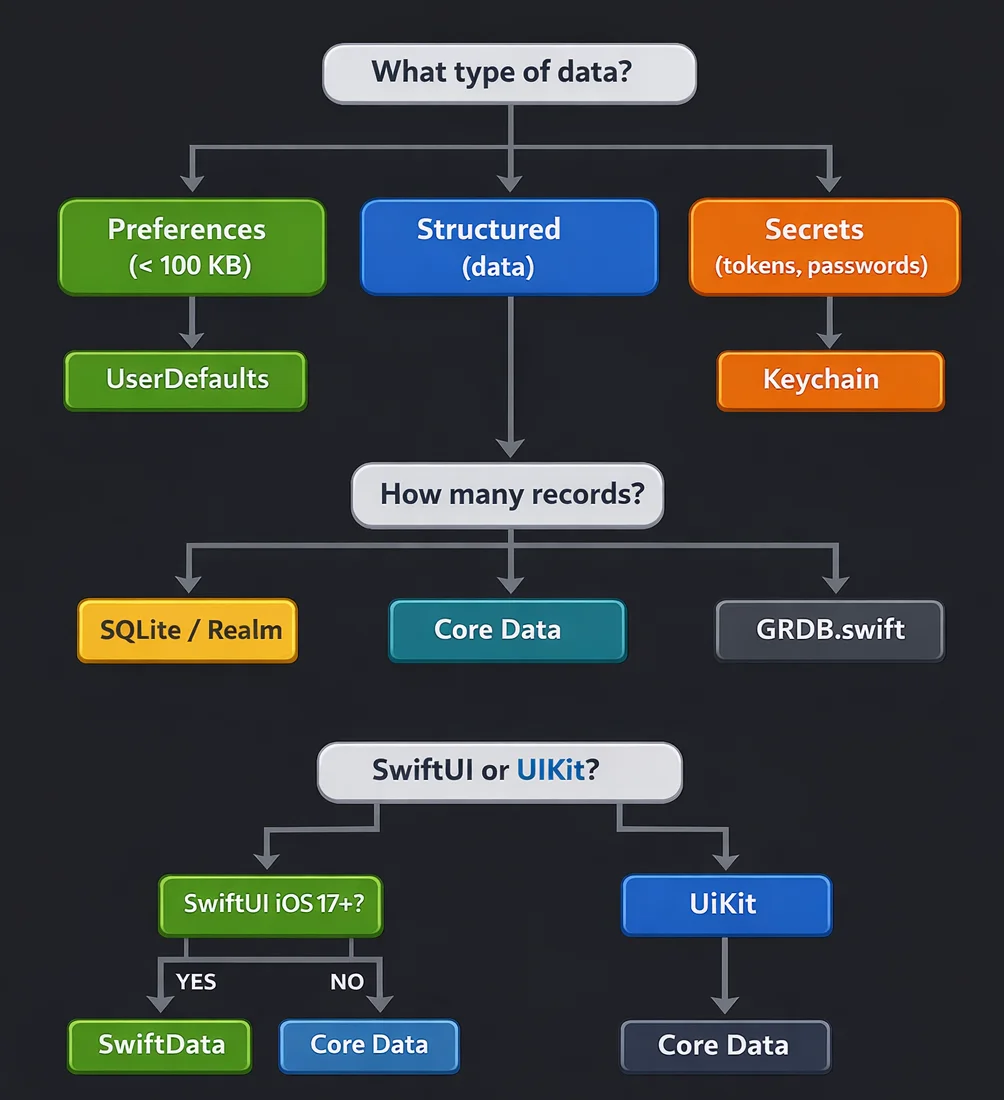
Part 5.1: Swift 6 and strict concurrency - who's handling it well?
In 2026 (iOS 26, Xcode 26), many projects now require Swift 6 with complete concurrency checking. This changes the balance of power between databases.
| Solution | Swift 6 Strict Mode | Notes |
|---|---|---|
| GRDB.swift | Full support | Designed with Sendable in mind |
| SQLiteData | Full support | Point-Free known for concurrency attention |
| SwiftData | Better in iOS 26 | @ModelActor fixes, but @Model still generates warnings |
| Core Data | Requires caution | NSManagedObject is not Sendable |
| Realm | Poor | Architecture predates Swift Concurrency |
Typical SwiftData problem in Swift 6
// Swift 6 strict mode
@Model
class Note {
    var title: String
    // Warning: Stored property 'title' of 'Sendable'-conforming class 'Note'
    // is mutable
}
How GRDB handles it better
// GRDB structs are naturally Sendable
struct Note: Codable, FetchableRecord, PersistableRecord, Sendable {
    var id: Int64?
    var title: String
    var content: String
}

// DatabaseQueue/Pool have clear isolation boundaries
try await dbPool.read { db in
    // Everything in this closure is isolated
    try Note.fetchAll(db)
}
Core Data in Swift 6
// NSManagedObject requires careful passing
actor NotesWorker {
    private let context: NSManagedObjectContext

    func fetchNoteTitles() async throws -> [String] {
        try await context.perform {
            let request = Note.fetchRequest()
            let notes = try self.context.fetch(request)
            // Return String (Sendable), not NSManagedObject
            return notes.map { $0.title ?? "" }
        }
    }
}
Pro tip: If you're starting a new project with Swift 6, GRDB + SQLiteData will be the least painful option for concurrency.
Part 6: Common mistakes and how to avoid them
Mistake #1: OAuth tokens in UserDefaults
// ❌ NEVER
UserDefaults.standard.set(accessToken, forKey: "token")

// ✅ ALWAYS
try keychainManager.save(accessToken.data(using: .utf8)!, for: "accessToken")
Mistake #2: Blocking main thread with I/O
// ❌ Blocks UI
let notes = try modelContext.fetch(FetchDescriptor<Note>())

// ✅ Background thread
Task.detached {
    let notes = try await modelContext.perform {
        try modelContext.fetch(FetchDescriptor<Note>())
    }
}
Mistake #3: Ignoring migrations
// ❌ "I'll deal with it later"
let container = try ModelContainer(for: Note.self)

// ✅ Migration plan from day 1
let container = try ModelContainer(
    for: Note.self,
    migrationPlan: NoteMigrationPlan.self
)
Mistake #4: No CloudKit error handling
// ❌ Naive approach
try context.save()  // What if sync fails?

// ✅ State handling
NotificationCenter.default.addObserver(
    forName: NSPersistentCloudKitContainer.eventChangedNotification,
    object: container,
    queue: .main
) { notification in
    guard let event = notification.userInfo?[
        NSPersistentCloudKitContainer.eventNotificationUserInfoKey
    ] as? NSPersistentCloudKitContainer.Event else { return }

    if let error = event.error {
        logger.error("CloudKit sync failed: \(error)")
    }
}
Mistake #5: Images in @Model as Data
// ❌ SwiftData loads images into memory on every fetch
@Model
class Photo {
    var imageData: Data  // 5 MB per photo × 1000 photos = 💀
}

// ✅ Store path, load lazily
@Model
class Photo {
    var imagePath: String

    @Transient
    var image: UIImage? {
        guard let data = FileManager.default.contents(atPath: imagePath) else {
            return nil
        }
        return UIImage(data: data)
    }
}
Part 7: Performance tips for each solution
SwiftData
// 1. Use FetchDescriptor with limit
var descriptor = FetchDescriptor<Note>(
    sortBy: [SortDescriptor(\.createdAt, order: .reverse)]
)
descriptor.fetchLimit = 50

// 2. Prefetch only needed properties (iOS 18+)
descriptor.propertiesToFetch = [\.title, \.createdAt]

// 3. Avoid @Query for large sets - use FetchDescriptor
// @Query loads everything, FetchDescriptor gives control
func loadRecentNotes() async throws -> [Note] {
    var descriptor = FetchDescriptor<Note>()
    descriptor.fetchLimit = 100
    descriptor.sortBy = [SortDescriptor(\.createdAt, order: .reverse)]
    return try modelContext.fetch(descriptor)
}
Core Data
// 1. Batch size for fetch request
fetchRequest.fetchBatchSize = 20

// 2. Faulting - don't preload relationships
fetchRequest.relationshipKeyPathsForPrefetching = ["author"]

// 3. NSBatchInsertRequest for bulk imports
let batchInsert = NSBatchInsertRequest(
    entity: Note.entity(),
    objects: noteDictionaries
)
try context.execute(batchInsert)
GRDB
// 1. WAL mode + DatabasePool
let dbPool = try DatabasePool(path: dbPath)

// 2. Prepared statements
let statement = try db.makeStatement(sql: "SELECT * FROM note WHERE id = ?")
let note = try Note.fetchOne(statement, arguments: [id])

// 3. Transactions for multiple operations
try dbQueue.write { db in
    for note in notes {
        try note.insert(db)
    }
}  // Single commit
Summary
| Solution | Maturity | Performance | Ease | SwiftUI | Future |
|---|---|---|---|---|---|
| SwiftData (iOS 26) | ⭐⭐⭐⭐ | ⭐⭐⭐ | ⭐⭐⭐⭐⭐ | ⭐⭐⭐⭐⭐ | ⭐⭐⭐⭐⭐ |
| SwiftData (iOS 17-18) | ⭐⭐⭐ | ⭐⭐⭐ | ⭐⭐⭐⭐ | ⭐⭐⭐⭐⭐ | ⭐⭐⭐⭐ |
| Core Data | ⭐⭐⭐⭐⭐ | ⭐⭐⭐⭐ | ⭐⭐⭐ | ⭐⭐⭐ | ⭐⭐⭐ |
| GRDB.swift | ⭐⭐⭐⭐⭐ | ⭐⭐⭐⭐⭐ | ⭐⭐⭐ | ⭐⭐⭐ | ⭐⭐⭐⭐ |
| SQLiteData (Point-Free) | ⭐⭐⭐ | ⭐⭐⭐⭐⭐ | ⭐⭐⭐⭐ | ⭐⭐⭐⭐⭐ | ⭐⭐⭐⭐ |
| Realm | ⭐⭐⭐ | ⭐⭐⭐⭐ | ⭐⭐⭐⭐ | ⭐⭐⭐ | ⭐ |
| UserDefaults | ⭐⭐⭐⭐⭐ | ⭐⭐⭐⭐⭐ | ⭐⭐⭐⭐⭐ | ⭐⭐⭐⭐ | ⭐⭐⭐⭐⭐ |
| Keychain | ⭐⭐⭐⭐⭐ | ⭐⭐⭐⭐ | ⭐⭐⭐ | ⭐⭐ | ⭐⭐⭐⭐⭐ |
Legend:
- Maturity - stability, documentation, community,
- Performance - raw operation speed,
- Ease - learning curve, boilerplate,
- SwiftUI - integration with @Query, @Observable, macros,
- Future - active development, Apple/community support.
Subjective ratings based on state as of February 2026, my own projects, and community discussions (Apple Forums, Reddit, Point-Free). SwiftData on iOS 26+ is really solid now – but only if you don't need shared CloudKit and don't have hundreds of thousands of records.
My personal recommendation for 2026:
- New SwiftUI project, minimum target iOS 26+: SwiftData - finally production ready,
- New SwiftUI project, minimum target iOS 17-18: SwiftData with caution, avoid complex relationships,
- When performance is critical: GRDB.swift + SQLiteData,
- Existing UIKit project: Core Data (don't force migration),
- Shared CloudKit: Core Data + CloudKit (SwiftData still doesn't support it!),
- Sensitive data: Always Keychain,
- Preferences: UserDefaults (< 100 KB),
- Realm: Plan migration - preferably ASAP.

Rafał Dubiel
Senior iOS Developer with 8+ years of experience building mobile applications. Passionate about clean architecture, Swift, and sharing knowledge with the community.
Share this article: