Navigation in a modular SwiftUI app - how to connect modules that don't know about each other
Requirements: iOS 17+, Swift 6+,
@Observable. If you need to support iOS 16, replace@ObservablewithObservableObject+@Published, and@Bindablewith@ObservedObject- the rest of the architecture stays unchanged.
You have a modular app. Tuist generates the project, each feature is a separate framework, the dependency graph looks beautiful on tuist graph. And then the moment comes when a screen in the Orders module needs to open product details from the Catalog module, and all that modularization elegance starts falling apart.
If you've ever added a dependency between two feature modules "because navigation required it," you know what I'm talking about. One import FeatureCatalog in FeatureOrders and suddenly your dependency graph has a cycle, build time grows, and the idea of module isolation lies in ruins.
This article describes how I solved this problem during the migration of a large app from MVP+Coordinator+UIKit to Clean Architecture+SwiftUI+MVVM+Tuist. It's not the only possible approach, but it works in production and - equally important - doesn't break SOLID principles.
The problem you can't see on diagrams
Most articles about SwiftUI navigation focus on a single project: one NavigationStack, one route enum, one big switch in .navigationDestination. And that works - as long as the entire app is a single target.
The moment you break the app into modules, problems appear that no tutorial covers:
A module doesn't know views from another module. FeatureOrders can't import FeatureCatalog - because it creates a dependency between features. And features should only depend on the Domain layer and possibly shared abstractions.
A central route enum doesn't scale. Adding a new screen requires modifying the enum in a module that all features depend on - breaking the Open/Closed Principle. Every new case is a potential merge conflict and recompilation of half the project.
A deep link must reach a screen that's "buried" in a module. A universal link myapp://orders/123/track must launch a view in FeatureOrders, pass through authentication, and optionally show order details - and URL parsing logic shouldn't live in any feature module.
Sheet, fullScreenCover, and alert are separate navigation paths. NavigationPath only handles push/pop. Modals, sheets, and alerts require separate logic and separate coordination between modules.
These aren't academic problems. Each of them appeared during my migration, and each required a specific architectural solution.
Module structure - the foundation navigation stands on
Before we get to code, we need to establish what the layers look like. Without that, any navigation solution will just be patching symptoms.
In my project I have the following hierarchy:
App (main target)
├── FeatureOrders      (framework - UI + ViewModel)
├── FeatureCatalog     (framework - UI + ViewModel)
├── FeatureProfile     (framework - UI + ViewModel)
├── DomainOrders       (framework - use cases, entities)
├── DomainCatalog      (framework - use cases, entities)
├── NavigationKit      (framework - navigation protocols)
├── SharedUI           (framework - shared components)
└── Core               (framework - networking, storage, DI)
The key module is NavigationKit. It contains no navigation logic - only protocols and data types. It's lightweight, has no dependencies on UIKit or SwiftUI (beyond Foundation), and can be imported by every feature module without introducing circular dependencies.
Dependency diagram:
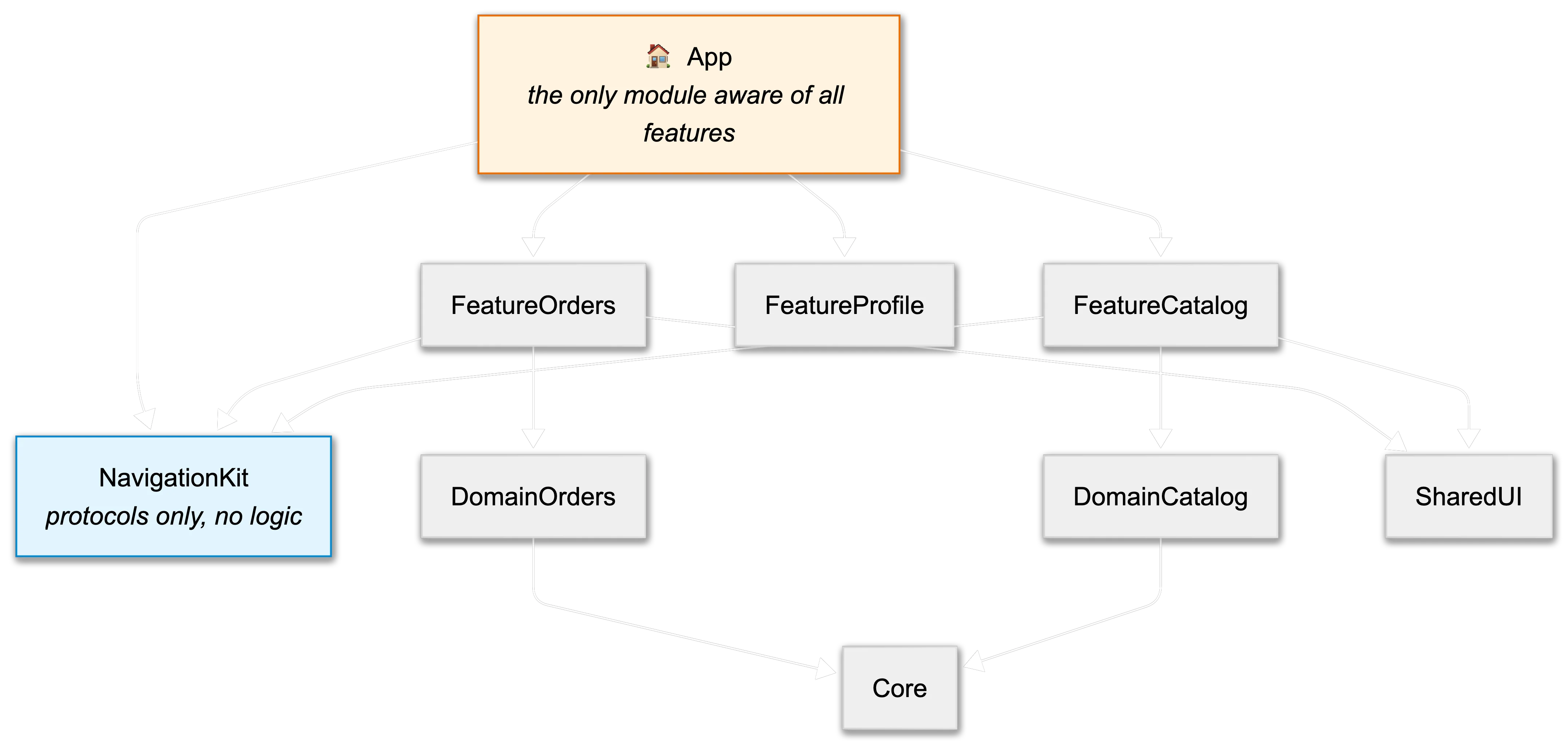
Feature modules never import each other. They communicate exclusively through abstractions defined in NavigationKit. This is the Dependency Inversion Principle in its purest form - high-level modules (features) and low-level modules (concrete navigation) depend on a shared abstraction.
NavigationKit - protocols instead of enums
Most SwiftUI navigation implementations rely on a central enum:
// ❌ Typical approach - central enum
enum AppRoute: Hashable {
    case orderDetail(id: String)
    case productDetail(id: String)
    case profile
    case settings
    // ... grows with every new screen
}
The problem is obvious: this enum must live in a module that all features know about. Every new screen is a new case. Every new case means recompiling everything that depends on that module. The Open/Closed Principle is dead.
My approach is different. NavigationKit defines a protocol that each module implements independently:
// NavigationKit/Sources/NavigationDestination.swift

import Foundation

/// Represents any navigation target in the app.
/// Each feature module defines its own types conforming to this protocol.
public protocol NavigationDestination: Hashable, Sendable {
    /// Unique name of the module this destination belongs to.
    /// Used for deep link routing and debugging.
    static var moduleName: String { get }
}
Each feature module defines its own destinations:
// FeatureOrders/Sources/Navigation/OrdersDestination.swift

import NavigationKit

public enum OrdersDestination: NavigationDestination {
    case list
    case detail(orderId: String)
    case tracking(orderId: String)

    public static let moduleName = "orders"
}
// FeatureCatalog/Sources/Navigation/CatalogDestination.swift

import NavigationKit

public enum CatalogDestination: NavigationDestination {
    case grid(categoryId: String?)
    case productDetail(productId: String)
    case search(query: String?)

    public static let moduleName = "catalog"
}
This is a fundamental difference: no module knows about another module's destinations. FeatureOrders knows OrdersDestination, FeatureCatalog knows CatalogDestination, and both only know the NavigationDestination protocol from NavigationKit.
Type-erased wrapper - how to put different types into one NavigationPath
There's one technical problem: NavigationPath requires all values it contains to be Hashable, but more importantly - .navigationDestination(for:) requires a concrete type. You can't write .navigationDestination(for: NavigationDestination.self) because it's a protocol with an existential type.
The solution is a type-erased wrapper:
// NavigationKit/Sources/AnyDestination.swift

import Foundation

/// Type-erased wrapper for any NavigationDestination.
/// Allows putting destinations from different modules into a single NavigationPath.
public struct AnyDestination: Hashable, Sendable {

    /// We store the original value as Any
    private let _wrapped: AnyHashableSendable

    /// Module name - needed for routing
    public let moduleName: String

    /// Type of the original destination - needed for view resolution
    public let destinationType: Any.Type

    public init<D: NavigationDestination>(_ destination: D) {
        self._wrapped = AnyHashableSendable(destination)
        self.moduleName = D.moduleName
        self.destinationType = D.self
    }

    /// Tries to extract the original destination from the wrapper.
    /// Returns nil if the type doesn't match.
    public func unwrap<D: NavigationDestination>(as type: D.Type) -> D? {
        _wrapped.base as? D
    }

    public static func == (lhs: AnyDestination, rhs: AnyDestination) -> Bool {
        lhs._wrapped == rhs._wrapped
    }

    public func hash(into hasher: inout Hasher) {
        _wrapped.hash(into: &hasher)
    }
}
You also need an AnyHashableSendable helper, because AnyHashable isn't Sendable:
// NavigationKit/Sources/AnyHashableSendable.swift

/// Sendable wrapper around AnyHashable.
/// Necessary because AnyHashable isn't Sendable,
/// and destinations may be passed between actors
/// (e.g., deep link parsing on a background thread → MainActor).
public struct AnyHashableSendable: @unchecked Sendable, Hashable {
    let base: AnyHashable

    public init<H: Hashable & Sendable>(_ value: H) {
        self.base = AnyHashable(value)
    }

    public static func == (lhs: Self, rhs: Self) -> Bool {
        lhs.base == rhs.base
    }

    public func hash(into hasher: inout Hasher) {
        base.hash(into: &hasher)
    }
}
@unchecked Sendableis safe here because we enforceSendableonNavigationDestination- we know the types inside the wrapper are thread-safe. Apple uses an identical approach in many internal types.
Now NavigationPath can store destinations from any module:
var path = NavigationPath()
path.append(AnyDestination(OrdersDestination.detail(orderId: "123")))
path.append(AnyDestination(CatalogDestination.productDetail(productId: "456")))
Navigator - single source of truth
We have destinations, we have a wrapper. We need an object that manages navigation state. I deliberately don't call it "Coordinator" - that term has a specific meaning in UIKit and I don't want to mix concepts.
// NavigationKit/Sources/Navigator.swift

import SwiftUI

/// Manages navigation state within a single NavigationStack.
/// Each tab / flow in the app has its own Navigator instance.
@Observable
@MainActor
public final class Navigator {

    /// Navigation path - source of truth for NavigationStack
    public var path = NavigationPath()

    /// Currently presented sheet
    public var presentedSheet: AnyDestination?

    /// Currently presented fullScreenCover
    public var presentedFullScreen: AnyDestination?

    /// Alert to display
    public var alert: NavigationAlert?

    public init() {}

    // MARK: - Push / Pop

    public func push(_ destination: some NavigationDestination) {
        path.append(AnyDestination(destination))
    }

    public func pop() {
        guard !path.isEmpty else { return }
        path.removeLast()
    }

    public func popToRoot() {
        path.removeLast(path.count)
    }

    // MARK: - Sheets & Full Screen Covers

    public func presentSheet(_ destination: some NavigationDestination) {
        presentedSheet = AnyDestination(destination)
    }

    public func presentFullScreen(_ destination: some NavigationDestination) {
        presentedFullScreen = AnyDestination(destination)
    }

    public func dismissSheet() {
        presentedSheet = nil
    }

    public func dismissFullScreen() {
        presentedFullScreen = nil
    }

    // MARK: - Alert

    public func showAlert(_ alert: NavigationAlert) {
        self.alert = alert
    }

    public func dismissAlert() {
        alert = nil
    }
}
// NavigationKit/Sources/NavigationAlert.swift

public struct NavigationAlert: Identifiable, Sendable {
    public let id = UUID()
    public let title: String
    public let message: String?
    public let actions: [AlertAction]

    public init(
        title: String,
        message: String? = nil,
        actions: [AlertAction] = [.ok]
    ) {
        self.title = title
        self.message = message
        self.actions = actions
    }
}

public struct AlertAction: Sendable {
    public let title: String
    public let role: ButtonRole?
    public let handler: @Sendable () -> Void

    public static let ok = AlertAction(title: "OK", role: nil, handler: {})

    public init(
        title: String,
        role: ButtonRole? = nil,
        handler: @escaping @Sendable () -> Void
    ) {
        self.title = title
        self.role = role
        self.handler = handler
    }
}
I use @Observable (iOS 17+) instead of ObservableObject, because @Observable tracks access to individual properties rather than notifying on every change - which has real performance implications for navigation.
Why not
@Published+ObservableObject? BecauseNavigationPathchanges frequently (every push/pop), andObservableObjectwould send a signal to every view observing the Navigator - even if that view only usespresentedSheet. With@Observable, a view listening topresentedSheetis not notified about changes topath.
Resolver - who builds views from destinations?
We have destinations and we have a Navigator. One element is missing: who turns AnyDestination into a concrete View?
This is where a pattern I call Destination Resolver comes in. It's a protocol that each feature module implements:
// NavigationKit/Sources/DestinationResolver.swift

import SwiftUI

/// Protocol for objects that can turn a destination into a View.
/// Each feature module provides its own implementation.
@MainActor
public protocol DestinationResolver {

    /// The destination type this resolver handles
    associatedtype Destination: NavigationDestination

    /// Creates a view for the given destination.
    @ViewBuilder
    func resolve(_ destination: Destination, navigator: Navigator) -> some View
}
Implementation in a feature module:
// FeatureOrders/Sources/Navigation/OrdersResolver.swift

import SwiftUI
import NavigationKit

public struct OrdersResolver: DestinationResolver {

    // Dependencies injected from outside - the module doesn't create use cases itself
    private let orderDetailViewModelFactory: (String) -> OrderDetailViewModel
    private let orderTrackingViewModelFactory: (String) -> OrderTrackingViewModel

    public init(
        orderDetailViewModelFactory: @escaping (String) -> OrderDetailViewModel,
        orderTrackingViewModelFactory: @escaping (String) -> OrderTrackingViewModel
    ) {
        self.orderDetailViewModelFactory = orderDetailViewModelFactory
        self.orderTrackingViewModelFactory = orderTrackingViewModelFactory
    }

    @ViewBuilder
    public func resolve(
        _ destination: OrdersDestination,
        navigator: Navigator
    ) -> some View {
        switch destination {
        case .list:
            OrderListView(navigator: navigator)
        case .detail(let orderId):
            OrderDetailView(
                viewModel: orderDetailViewModelFactory(orderId),
                navigator: navigator
            )
        case .tracking(let orderId):
            OrderTrackingView(
                viewModel: orderTrackingViewModelFactory(orderId),
                navigator: navigator
            )
        }
    }
}
Notice that the resolver accepts factory closures, not ready-made objects. This way, FeatureOrders doesn't need to know where dependencies come from - it simply knows it will get a ViewModel when it needs one. This preserves Dependency Inversion: the module depends on an abstraction (a closure with the right type), not a concrete implementation.
Resolver registry - composition in the App layer
Resolvers live in feature modules, but someone needs to collect them in one place. That's the responsibility of the App layer:
// NavigationKit/Sources/DestinationResolverRegistry.swift

import SwiftUI

/// Collects resolvers from all modules and resolves AnyDestination into a View.
/// Lives in the App layer - the only place that knows all modules.
@MainActor
public final class DestinationResolverRegistry {

    /// Closure type that resolves AnyDestination into AnyView
    public typealias ResolverClosure = @MainActor (AnyDestination, Navigator) -> AnyView?

    private var resolvers: [String: ResolverClosure] = [:]

    public init() {}

    /// Registers a resolver for a given destination type
    public func register<R: DestinationResolver>(_ resolver: R) {
        let moduleName = R.Destination.moduleName
        resolvers[moduleName] = { anyDest, navigator in
            guard let destination = anyDest.unwrap(as: R.Destination.self) else {
                return nil
            }
            return AnyView(resolver.resolve(destination, navigator: navigator))
        }
    }

    /// Resolves AnyDestination into a View.
    /// Returns a fallback if no matching resolver is found.
    @ViewBuilder
    public func resolve(
        _ destination: AnyDestination,
        navigator: Navigator
    ) -> some View {
        if let resolverClosure = resolvers[destination.moduleName],
           let view = resolverClosure(destination, navigator) {
            view
        } else {
            #if DEBUG
            Text("⚠️ No resolver for module: \(destination.moduleName)")
                .foregroundStyle(.red)
                .font(.caption)
            #else
            EmptyView()
            #endif
        }
    }
}
Yes,
AnyViewappears here. I knowAnyViewis "forbidden" in many SwiftUI guides. But here it's used in one specific place - at the boundary between modules, when resolving destinations. This is notAnyViewinside a list cell being called 1000 times per second. It's a wrapper around a full-screen view, created once per navigation. The overhead is negligible - Apple internally usesUIHostingController<AnyView>as a bridge between SwiftUI and UIKit, so NavigationStack operates on type-erased views under the hood anyway.
Composition in the App layer:
// App/Sources/AppDependencyContainer.swift
// Only App imports all feature modules - this is the only such place in the project

import NavigationKit
import FeatureOrders    // only App knows FeatureOrders
import FeatureCatalog   // only App knows FeatureCatalog
import FeatureProfile   // only App knows FeatureProfile

@MainActor
final class AppDependencyContainer {

    let navigator = Navigator()
    let resolverRegistry = DestinationResolverRegistry()

    init() {
        registerResolvers()
    }

    private func registerResolvers() {
        // Orders
        resolverRegistry.register(
            OrdersResolver(
                orderDetailViewModelFactory: { [weak self] orderId in
                    OrderDetailViewModel(
                        orderId: orderId,
                        getOrderUseCase: self?.makeGetOrderUseCase() ?? .preview
                    )
                },
                orderTrackingViewModelFactory: { orderId in
                    OrderTrackingViewModel(orderId: orderId)
                }
            )
        )

        // Catalog
        resolverRegistry.register(
            CatalogResolver(
                productDetailViewModelFactory: { productId in
                    ProductDetailViewModel(productId: productId)
                }
            )
        )

        // Profile
        resolverRegistry.register(ProfileResolver())
    }
}
This is the only place in the app that imports all feature modules. The rest of the code operates exclusively on abstractions.
Connecting to the view - NavigationStack and the registry
Now we need to wire this into SwiftUI. I create a dedicated View that wraps NavigationStack and resolves destinations:
// NavigationKit/Sources/ModularNavigationStack.swift

import SwiftUI

/// NavigationStack with built-in destination resolution from the registry.
/// Replaces the standard NavigationStack in modular apps.
public struct ModularNavigationStack<Root: View>: View {

    @Bindable private var navigator: Navigator
    private let registry: DestinationResolverRegistry
    private let root: Root

    public init(
        navigator: Navigator,
        registry: DestinationResolverRegistry,
        @ViewBuilder root: () -> Root
    ) {
        self.navigator = navigator
        self.registry = registry
        self.root = root()
    }

    public var body: some View {
        NavigationStack(path: $navigator.path) {
            root
                .navigationDestination(for: AnyDestination.self) { destination in
                    registry.resolve(destination, navigator: navigator)
                }
        }
        .sheet(item: $navigator.presentedSheet) { destination in
            registry.resolve(destination, navigator: navigator)
        }
        .fullScreenCover(item: $navigator.presentedFullScreen) { destination in
            registry.resolve(destination, navigator: navigator)
        }
        .alert(
            navigator.alert?.title ?? "",
            isPresented: Binding(
                get: { navigator.alert != nil },
                set: { if !$0 { navigator.dismissAlert() } }
            ),
            presenting: navigator.alert
        ) { alert in
            ForEach(Array(alert.actions.enumerated()), id: \.offset) { _, action in
                Button(action.title, role: action.role) {
                    action.handler()
                }
            }
        } message: { alert in
            if let message = alert.message {
                Text(message)
            }
        }
    }
}
For AnyDestination to work with .sheet(item:), it must be Identifiable:
// NavigationKit/Sources/AnyDestination+Identifiable.swift

extension AnyDestination: Identifiable {
    /// Stable ID composed of module name, type, and value hash.
    /// Better than hashValue alone - lower collision risk
    /// with multiple destinations of the same type.
    public var id: String {
        "\(moduleName).\(String(describing: destinationType))-\(_wrapped.base.hashValue)"
    }
}
Usage in App:
// App/Sources/MainTabView.swift

import SwiftUI
import NavigationKit
import FeatureOrders
import FeatureCatalog

struct MainTabView: View {

    let container: AppDependencyContainer

    var body: some View {
        TabView {
            Tab("Orders", systemImage: "bag") {
                ModularNavigationStack(
                    navigator: container.ordersNavigator,
                    registry: container.resolverRegistry
                ) {
                    OrderListView(navigator: container.ordersNavigator)
                }
            }

            Tab("Catalog", systemImage: "square.grid.2x2") {
                ModularNavigationStack(
                    navigator: container.catalogNavigator,
                    registry: container.resolverRegistry
                ) {
                    CatalogGridView(navigator: container.catalogNavigator)
                }
            }
        }
    }
}
Note that each tab has its own Navigator instance. This is important because each tab maintains an independent navigation stack. If they shared the same Navigator, a pop in one tab could affect the other.
Cross-module navigation - without importing anything
Now we get to the heart of it. How does FeatureOrders navigate to a screen in FeatureCatalog?
The answer: it doesn't navigate directly. It tells the Navigator "I want to show product details with this ID," and Navigator + Registry do the rest.
But there's a catch: FeatureOrders doesn't know CatalogDestination because it doesn't import FeatureCatalog. We need a middleman.
We define a generic cross-module navigation mechanism in NavigationKit:
// NavigationKit/Sources/CrossModuleNavigation.swift

/// Protocol for navigation actions that go beyond a single module.
/// The feature module defines WHAT it needs, and the App layer decides HOW to fulfill it.
@MainActor
public protocol CrossModuleNavigationHandler: Sendable {
    func showProductDetail(productId: String)
    func showUserProfile(userId: String)
    func showOrderDetail(orderId: String)
}
The feature module uses this handler instead of navigating directly:
// FeatureOrders/Sources/Screens/OrderDetailView.swift

import SwiftUI
import NavigationKit

struct OrderDetailView: View {

    let viewModel: OrderDetailViewModel
    let navigator: Navigator

    @Environment(\.crossModuleNavigation)
    private var crossModuleNavigation

    var body: some View {
        VStack {
            // ... order details ...

            // Navigation to a product from another module
            Button("View product") {
                crossModuleNavigation.showProductDetail(
                    productId: viewModel.order.productId
                )
            }

            // Navigation within the module - directly through Navigator
            Button("Track shipment") {
                navigator.push(
                    OrdersDestination.tracking(orderId: viewModel.order.id)
                )
            }
        }
    }
}
The handler is injected through the SwiftUI Environment:
// NavigationKit/Sources/CrossModuleNavigation+Environment.swift

import SwiftUI

private struct CrossModuleNavigationKey: EnvironmentKey {
    static let defaultValue: CrossModuleNavigationHandler = NoOpNavigationHandler()
}

extension EnvironmentValues {
    public var crossModuleNavigation: CrossModuleNavigationHandler {
        get { self[CrossModuleNavigationKey.self] }
        set { self[CrossModuleNavigationKey.self] = newValue }
    }
}

/// Default implementation that does nothing.
/// In DEBUG mode it logs a warning - in production it's silent.
struct NoOpNavigationHandler: CrossModuleNavigationHandler {
    func showProductDetail(productId: String) {
        #if DEBUG
        print("⚠️ CrossModuleNavigation: no handler for showProductDetail")
        #endif
    }
    func showUserProfile(userId: String) {
        #if DEBUG
        print("⚠️ CrossModuleNavigation: no handler for showUserProfile")
        #endif
    }
    func showOrderDetail(orderId: String) {
        #if DEBUG
        print("⚠️ CrossModuleNavigation: no handler for showOrderDetail")
        #endif
    }
}
Handler implementation in the App layer - the only place that knows all modules:
// App/Sources/Navigation/AppCrossModuleNavigationHandler.swift
// The only place that maps navigation intents to concrete destinations

import NavigationKit
import FeatureOrders    // only App knows that OrdersDestination exists
import FeatureCatalog   // only App knows that CatalogDestination exists
import FeatureProfile   // only App knows that ProfileDestination exists

@MainActor
final class AppCrossModuleNavigationHandler: CrossModuleNavigationHandler {

    private let navigator: Navigator

    init(navigator: Navigator) {
        self.navigator = navigator
    }

    func showProductDetail(productId: String) {
        navigator.push(CatalogDestination.productDetail(productId: productId))
    }

    func showUserProfile(userId: String) {
        navigator.push(ProfileDestination.detail(userId: userId))
    }

    func showOrderDetail(orderId: String) {
        navigator.push(OrdersDestination.detail(orderId: orderId))
    }
}
And injecting it into the environment:
// App/Sources/MainTabView.swift (extended)

ModularNavigationStack(
    navigator: container.ordersNavigator,
    registry: container.resolverRegistry
) {
    OrderListView(navigator: container.ordersNavigator)
}
.environment(
    \.crossModuleNavigation,
    AppCrossModuleNavigationHandler(navigator: container.ordersNavigator)
)
Notice what's happening here from a SOLID perspective:
- Single Responsibility: Each resolver is responsible for one module. Navigator manages state. CrossModuleHandler maps intents to concrete actions.
- Open/Closed: Adding a new module = a new resolver + a new enum. Existing modules require no changes. CrossModuleHandler only needs a change if the new module exposes navigation to other modules - but the handler lives in the App layer, not in a feature module.
- Liskov Substitution:
NoOpNavigationHandleris a fully valid implementation - we use it in previews and tests. - Interface Segregation: The feature module depends on
CrossModuleNavigationHandlerwith three methods, not a gigantic Router with a hundred. - Dependency Inversion: The feature module defines what it needs (a protocol in
NavigationKit), and the App layer provides the implementation.
The entire cross-module navigation flow in one diagram:
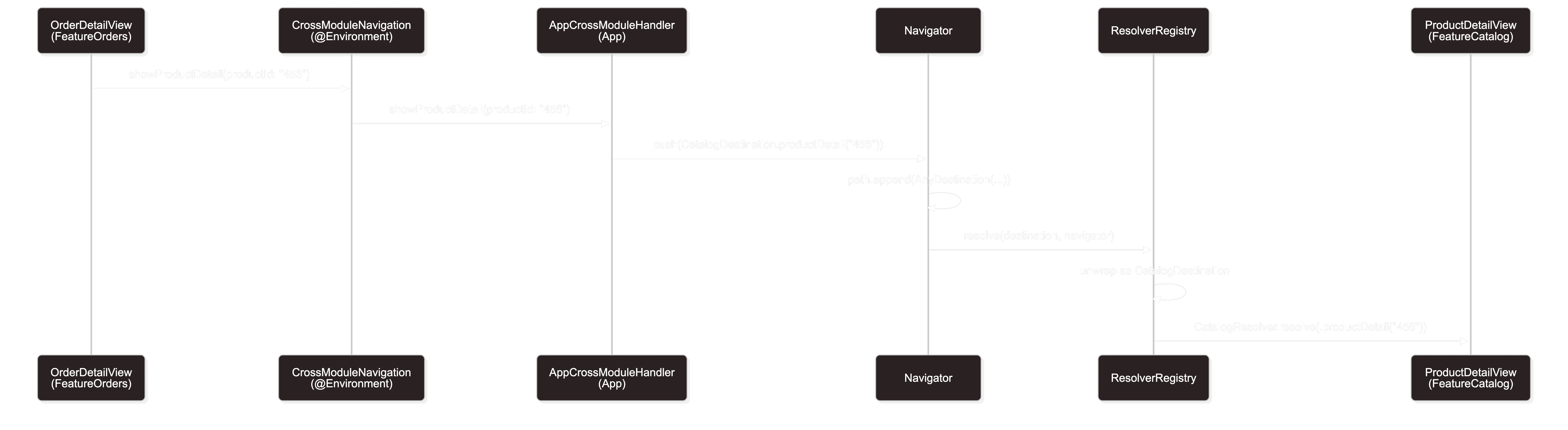
Notice: OrderDetailView never imports FeatureCatalog. It doesn't even know that CatalogDestination exists. It only knows the CrossModuleNavigationHandler abstraction from NavigationKit.
Deep linking - from URL to screen
Deep linking in a modular app is a separate problem. The URL myapp://catalog/product/456 must be parsed, validated, and transformed into navigation - and the parsing logic shouldn't live in any feature module.
I define a parsing protocol in NavigationKit:
// NavigationKit/Sources/DeepLink/DeepLinkParser.swift

import Foundation

/// Each module that handles deep links provides an implementation of this protocol.
public protocol DeepLinkParser {
    /// Tries to parse a URL into a destination from this module.
    /// Returns nil if the URL doesn't match this module.
    func parse(url: URL) -> AnyDestination?
}
Implementation in a feature module:
// FeatureCatalog/Sources/Navigation/CatalogDeepLinkParser.swift

import Foundation
import NavigationKit

public struct CatalogDeepLinkParser: DeepLinkParser {

    public init() {}

    public func parse(url: URL) -> AnyDestination? {
        guard let components = URLComponents(url: url, resolvingAgainstBaseURL: false),
              let host = components.host else {
            return nil
        }

        let pathSegments = components.path
            .split(separator: "/")
            .map(String.init)

        // myapp://catalog/product/{productId}
        if host == "catalog",
           pathSegments.count == 2,
           pathSegments[0] == "product" {
            return AnyDestination(
                CatalogDestination.productDetail(productId: pathSegments[1])
            )
        }

        // myapp://catalog/search?q={query}
        if host == "catalog",
           pathSegments.first == "search" {
            let query = components.queryItems?
                .first(where: { $0.name == "q" })?.value
            return AnyDestination(
                CatalogDestination.search(query: query)
            )
        }

        return nil
    }
}
What about more complex scenarios? For example, a deep link that requires authentication:
// FeatureOrders/Sources/Navigation/OrdersDeepLinkParser.swift

public struct OrdersDeepLinkParser: DeepLinkParser {

    public init() {}

    public func parse(url: URL) -> AnyDestination? {
        guard let components = URLComponents(url: url, resolvingAgainstBaseURL: false),
              components.host == "orders" else {
            return nil
        }

        let pathSegments = components.path
            .split(separator: "/")
            .map(String.init)

        // myapp://orders/{orderId}/track?after_login=true
        // The after_login parameter tells the router the user might not be logged in
        // - the DeepLinkRouter must handle this (see below)
        if pathSegments.count == 2, pathSegments[1] == "track" {
            return AnyDestination(
                OrdersDestination.tracking(orderId: pathSegments[0])
            )
        }

        // myapp://orders/{orderId}
        if pathSegments.count == 1 {
            return AnyDestination(
                OrdersDestination.detail(orderId: pathSegments[0])
            )
        }

        return nil
    }
}
// App/Sources/DeepLink/DeepLinkRouter.swift

import NavigationKit
import FeatureOrders
import FeatureCatalog

@MainActor
final class DeepLinkRouter {

    private let parsers: [DeepLinkParser]
    private let navigators: [String: Navigator] // moduleName → navigator
    private let authStateProvider: () -> Bool    // whether the user is logged in
    private let tabSwitcher: (String) -> Void    // switches the active tab

    /// Queue for deep links waiting to be handled
    /// (e.g., user needs to log in first)
    private var pendingDeepLink: URL?

    init(
        parsers: [DeepLinkParser],
        navigators: [String: Navigator],
        authStateProvider: @escaping () -> Bool,
        tabSwitcher: @escaping (String) -> Void
    ) {
        self.parsers = parsers
        self.navigators = navigators
        self.authStateProvider = authStateProvider
        self.tabSwitcher = tabSwitcher
    }

    /// Handles a deep link URL.
    /// Returns true if the URL was handled (or queued).
    @discardableResult
    func handle(_ url: URL) -> Bool {
        // Check if the deep link requires authentication
        let requiresAuth = URLComponents(url: url, resolvingAgainstBaseURL: false)?
            .queryItems?.contains(where: { $0.name == "after_login" }) ?? false

        if requiresAuth && !authStateProvider() {
            // Queue it - we'll handle it after login
            pendingDeepLink = url
            return true
        }

        return executeNavigation(for: url)
    }

    /// Call after login - handles the queued deep link
    func processPendingDeepLink() {
        guard let url = pendingDeepLink else { return }
        pendingDeepLink = nil
        executeNavigation(for: url)
    }

    @discardableResult
    private func executeNavigation(for url: URL) -> Bool {
        for parser in parsers {
            if let destination = parser.parse(url: url) {
                guard let navigator = navigators[destination.moduleName] else {
                    #if DEBUG
                    print("⚠️ DeepLink: no navigator for \(destination.moduleName)")
                    #endif
                    return false
                }

                // Switch to the appropriate tab
                tabSwitcher(destination.moduleName)

                // Pop to root before deep link navigation
                navigator.popToRoot()

                // Short delay - NavigationStack needs one render cycle
                // after popToRoot. Without it, the push may be ignored.
                Task { @MainActor in
                    try? await Task.sleep(for: .milliseconds(100))
                    navigator.push(destination)
                }

                return true
            }
        }
        return false
    }
}
A note about
Task.sleepafterpopToRoot.NavigationStackneeds one render cycle afterremoveLast(path.count)to update its state. Without the delay, thepushmay be ignored. Apple doesn't provide an API for "wait until navigation finishes" - this is a known issue, and this solution works reliably in production.
Wiring it up in App:
// App/Sources/MyApp.swift

@main
struct MyApp: App {

    let container = AppDependencyContainer()

    var body: some Scene {
        WindowGroup {
            MainTabView(container: container)
                .onOpenURL { url in
                    container.deepLinkRouter.handle(url)
                }
        }
    }
}
Tuist configuration - what it looks like in Project.swift
Theory is one thing, but without a proper Tuist configuration none of this will work. Here's a simplified version of my Project.swift:
// Project.swift

import ProjectDescription

let project = Project(
    name: "MyApp",
    targets: [
        // MARK: - NavigationKit (zero dependencies on features)
        .target(
            name: "NavigationKit",
            destinations: .iOS,
            product: .framework,
            bundleId: "com.myapp.navigationkit",
            sources: ["Modules/NavigationKit/Sources/**"],
            dependencies: []
        ),

        // MARK: - Feature Modules (depend on NavigationKit, not on each other)
        .target(
            name: "FeatureOrders",
            destinations: .iOS,
            product: .framework,
            bundleId: "com.myapp.feature.orders",
            sources: ["Modules/FeatureOrders/Sources/**"],
            resources: ["Modules/FeatureOrders/Resources/**"],
            dependencies: [
                .target(name: "NavigationKit"),
                .target(name: "DomainOrders"),
                .target(name: "SharedUI"),
            ]
        ),
        .target(
            name: "FeatureCatalog",
            destinations: .iOS,
            product: .framework,
            bundleId: "com.myapp.feature.catalog",
            sources: ["Modules/FeatureCatalog/Sources/**"],
            resources: ["Modules/FeatureCatalog/Resources/**"],
            dependencies: [
                .target(name: "NavigationKit"),
                .target(name: "DomainCatalog"),
                .target(name: "SharedUI"),
            ]
        ),

        // MARK: - App (the only place that knows all modules)
        .target(
            name: "MyApp",
            destinations: .iOS,
            product: .app,
            bundleId: "com.myapp",
            sources: ["App/Sources/**"],
            resources: ["App/Resources/**"],
            dependencies: [
                .target(name: "NavigationKit"),
                .target(name: "FeatureOrders"),
                .target(name: "FeatureCatalog"),
                .target(name: "FeatureProfile"),
            ]
        ),
    ]
)
The key rule: feature modules have no dependencies on each other. The only module that knows all features is App. NavigationKit depends on nothing (beyond Foundation).
You can verify the dependency graph with a single command:
tuist graph
If you see an arrow from FeatureOrders to FeatureCatalog, something went wrong.
Testing navigation
One of the biggest advantages of this approach is testability. Navigator is a plain @Observable object, so you can check navigation state without launching the UI.
// FeatureOrdersTests/OrderDetailNavigationTests.swift

import Testing
import NavigationKit
@testable import FeatureOrders

@MainActor
struct OrderDetailNavigationTests {

    @Test("Tapping 'Track shipment' pushes tracking destination")
    func pushesTrackingDestination() {
        let navigator = Navigator()
        let viewModel = OrderDetailViewModel.preview(orderId: "123")

        // Simulate the action the view would trigger
        navigator.push(OrdersDestination.tracking(orderId: "123"))

        #expect(navigator.path.count == 1)
    }

    @Test("Cross-module navigation calls the handler")
    func crossModuleNavigation() async {
        let handler = SpyCrossModuleNavigationHandler()

        handler.showProductDetail(productId: "456")

        #expect(handler.showProductDetailCalled)
        #expect(handler.lastProductId == "456")
    }
}

// MARK: - Test Doubles

final class SpyCrossModuleNavigationHandler: CrossModuleNavigationHandler, @unchecked Sendable {

    var showProductDetailCalled = false
    var lastProductId: String?

    func showProductDetail(productId: String) {
        showProductDetailCalled = true
        lastProductId = productId
    }

    func showUserProfile(userId: String) {}
    func showOrderDetail(orderId: String) {}
}
Testing deep links is equally straightforward:
@Test("Parser recognizes a product URL")
func parsesProductURL() {
    let parser = CatalogDeepLinkParser()
    let url = URL(string: "myapp://catalog/product/456")!

    let destination = parser.parse(url: url)

    #expect(destination != nil)
    #expect(destination?.moduleName == "catalog")

    let catalogDest = destination?.unwrap(as: CatalogDestination.self)
    #expect(catalogDest == .productDetail(productId: "456"))
}

@Test("Parser ignores an unknown URL")
func ignoresUnknownURL() {
    let parser = CatalogDeepLinkParser()
    let url = URL(string: "myapp://settings/notifications")!

    let destination = parser.parse(url: url)

    #expect(destination == nil)
}
Tests don't require XCUIApplication, don't launch the simulator, don't wait for animations. They're fast and deterministic - exactly what you want from navigation unit tests.
Things to keep in mind - production pitfalls
Every architectural solution has its dark sides. Here are the problems I ran into while implementing this approach:
1. NavigationPath and Codable.
NavigationPath supports Codable (for state restoration), but only if all types it contains are also Codable. AnyDestination as a type-erased wrapper complicates this - you need to manually implement encoding/decoding with a type registry. If you don't need state restoration, you can skip this.
2. Navigation from the background (e.g., push notification).
When the app receives a push notification and needs to navigate to a specific screen, you must ensure the right tab is active, the navigator is initialized, and the view is ready to accept navigation. In practice, this means queuing deep links and replaying them after the UI is fully initialized.
3. Memory leaks in resolver closures.
Factory closures in resolvers can create retain cycles if you capture self (the dependency container) with a strong reference. Always use [weak self] in closures injected into resolvers.
4. iPad and NavigationSplitView.
This entire approach assumes NavigationStack. On iPad you likely want NavigationSplitView with a sidebar. ModularNavigationStack must then support two modes - or you create a separate ModularNavigationSplitView. This is another layer of complexity I didn't cover because every app has different requirements here.
5. SwiftUI Previews.
Previews in a modular project can be finicky. Remember to provide NoOpNavigationHandler as the default value in EnvironmentKey - without it, previews crash with "missing environment value." Tip: in each feature module, create a View extension with a preview helper:
extension View {
    /// Wraps the view with all required environment values for previews.
    func previewNavigationEnvironment() -> some View {
        self.environment(
            \.crossModuleNavigation,
            NoOpNavigationHandler()
        )
    }
}

// Usage in a preview:
#Preview {
    NavigationStack {
        OrderDetailView(
            viewModel: .preview(orderId: "123"),
            navigator: Navigator()
        )
    }
    .previewNavigationEnvironment()
}
6. Performance with deep navigation stacks.
NavigationPath + AnyDestination has a type-erasing cost on every element. With 5–10 screens on the stack, this is unnoticeable. With 15+ pushes (e.g., catalog → product → related product → another...) you may observe animation delays. Solution: if your app allows deep nesting, consider popToRoot() + push instead of continuously stacking - or use a sheet/modal as a "reset point."
7. State restoration / Handoff.
If you want to support Codable in NavigationPath (to restore navigation state after the app is killed), you need to write a custom encoder for AnyDestination. This requires a type registry: moduleName → Decodable.Type, so you know how to decode a destination from binary data. That's a significant chunk of additional code I don't cover in this article - but the architecture is ready for it thanks to moduleName.
8. iOS 18+ navigation API changes.
Starting with iOS 18, Apple added new navigation modifiers (e.g., .navigationTransition). The code in this article is fully compatible with them - ModularNavigationStack is just a regular NavigationStack under the hood, so new APIs work without changes. If you need a custom transition per destination, add a transition property to NavigationDestination and apply it in the resolver.
Alternatives - what I considered and why I rejected it
I don't want to pretend my approach is the only right one. Here are the alternatives I considered:
-
Central enum + Routes module. A single shared source for all routes. Simple, but breaks Open/Closed - every new screen means modifying the enum. In a project with twenty screens, this is acceptable. In a project with seventy - it's not,
-
Protocol-oriented destinations (like Dylan Mace's approach). Each destination conforms to a protocol with a
body(navigator:)method that creates its own view. Elegant, but the destination becomes both navigation data AND a view factory - breaking Single Responsibility. It also requiresAnyViewin the destination rather than in one central place, -
Notification Center / Event Bus. A module posts a notification "I want to navigate to a product," someone catches it and acts. It works, but loses type-safety, is hard to debug, and there's no guarantee anyone will handle the event. If the handler isn't registered - silence,
-
The Composable Architecture (TCA). If you're already using TCA, it has a built-in navigation mechanism through state - in that case you don't need this article.
Summary - what you gain
Let's summarize the tangible benefits:
- Module isolation - feature modules don't import each other. The dependency graph is clean, and
tuist graphconfirms it, - Type-safety - destinations are strongly-typed enums. The compiler catches navigation errors at compile-time, not at runtime,
- Testability - Navigator, resolvers, deep link parsers - all plain objects you can test without UITests,
- Scalability - adding a new module means: a new destination enum, a new resolver, registration in
App. Existing modules require no changes, - Debuggability - every destination has a
moduleName, so navigation logs tell you exactly what's happening. In debug builds you see warnings about missing resolvers.
The approach isn't perfect - it has boilerplate overhead (wrapper, registry, handler) and requires discipline from the team. But in a project with many modules, that overhead pays for itself many times over in the form of a clean dependency graph, fast builds, and the ability to work on modules independently.
Navigation code is the glue that holds the app together. It's worth making sure that glue is well-designed.

Rafał Dubiel
Senior iOS Developer with 8+ years of experience building mobile applications. Passionate about clean architecture, Swift, and sharing knowledge with the community.
Share this article: